Projects
What I've actually built, not a skills list.
Turning Buying Signals Into Outreach
~3 min read
A rep drops a buying signal in Slack; Claude drafts two ready-to-send outbound sequences in seconds, then turns an approval into real Gmail drafts.
Turning Buying Signals Into Outreach
~3 min readA rep drops a buying signal in Slack; Claude drafts two ready-to-send outbound sequences in seconds, then turns an approval into real Gmail drafts.
The Problem
Reps see buying signals constantly — a funding round, an acquisition, a leadership change, a security incident at a target account — but turning a signal into a genuinely differentiated outbound sequence takes more time than most reps have in the moment. So the signal gets a LinkedIn like instead of a sequence, and the window passes.
The Build
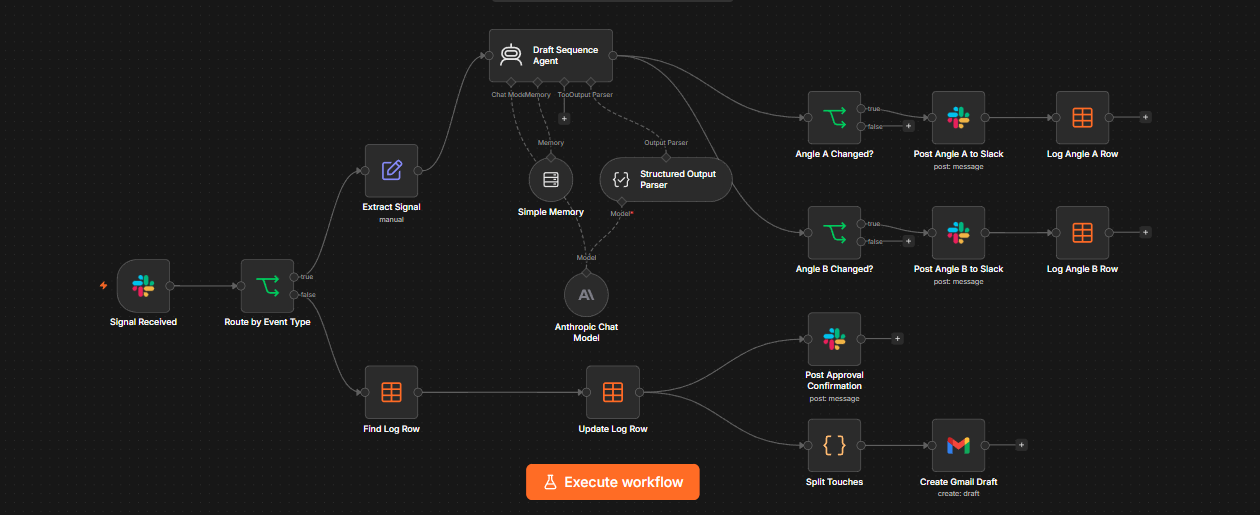
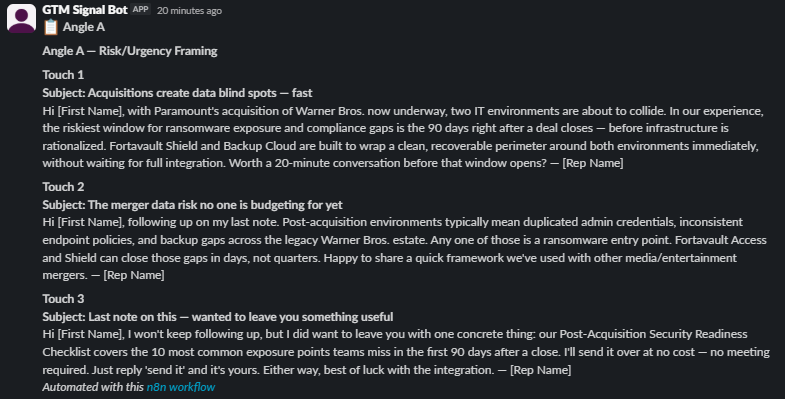
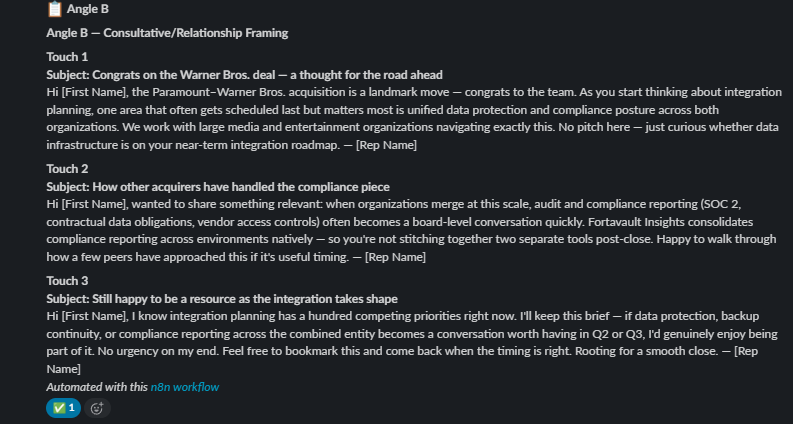
An AI agent lives in a Slack channel. A rep @mentions it with a plain-language signal — "Paramount just bought Warner Bros." — and Claude classifies the signal type, then drafts two complete, genuinely different 3-touch outbound email sequences: Angle A leads with risk/urgency framing, Angle B leads with a consultative/relationship framing. Both post back into the Slack thread within seconds, grounded in a real company context (below) so the copy references actual products and competitive positioning instead of generic filler.
From there it's an actual review loop, not a one-shot generation. The rep can reply in-thread with a plain instruction — "make angle B shorter" — and the agent edits just that angle using per-thread conversation memory, then reposts only what changed instead of re-flooding the thread with both angles again. When a rep reacts with ✅ on the angle they want, the workflow logs the approval, confirms it in-thread, and splits that angle's three touches into three separate Gmail drafts — each with its own real subject line and no leftover Slack instructions — ready to review and send. Every draft, edit, and approval is logged to an n8n Data Table for an audit trail, and a shared error-handling workflow alerts Slack and logs any node failure automatically.
Company Context
Every draft is grounded in a fictional company I built specifically for this project — Fortavault, Inc., a data protection and security platform — so the agent has real products, industries, and competitors to reason about instead of writing in a vacuum.
Products
- Fortavault Backup Cloud — cloud backup & disaster recovery
- Fortavault Shield — ransomware detection, isolation, one-click rollback
- Fortavault Access — zero-trust endpoint access control
- Fortavault Insights — compliance & audit reporting (HIPAA, SOC 2, GLBA)
Industries served
Competitors & how Fortavault wins
- Veyron Data (backup/DR) — faster to recover, simpler SaaS-data setup
- Ashcombe Systems (ransomware detection point solution) — Fortavault pairs detection with backup for one-click recovery
- Cyphertide (zero-trust access) — better suited for regulated industries needing audit-ready logs
- Northgate Cloud Security (broad platform incumbent) — more focused roadmap, faster implementation
- Ridgeline Compliance (compliance reporting point tool) — Fortavault Insights is natively integrated with backup/security data
Live Run

Impact (measured from live runs)
Bringing Dead Deals Back to Life
~3 min read
A daily scan flags old lost deals worth a second shot, drafts the re-engagement pitch, and waits for a rep's Slack approval before reopening anything.
Bringing Dead Deals Back to Life
~3 min readA daily scan flags old lost deals worth a second shot, drafts the re-engagement pitch, and waits for a rep's Slack approval before reopening anything.
The Problem
Closed Lost opportunities pile up in Salesforce and get forgotten — even the ones that were lost for reasons that don't hold up six months later. A budget freeze thaws. A champion who left gets replaced by someone inheriting the exact same problem. Nobody has time to manually comb through the Closed Lost list and guess which dead deals are actually worth a second look, so they just stay dead.
The Build
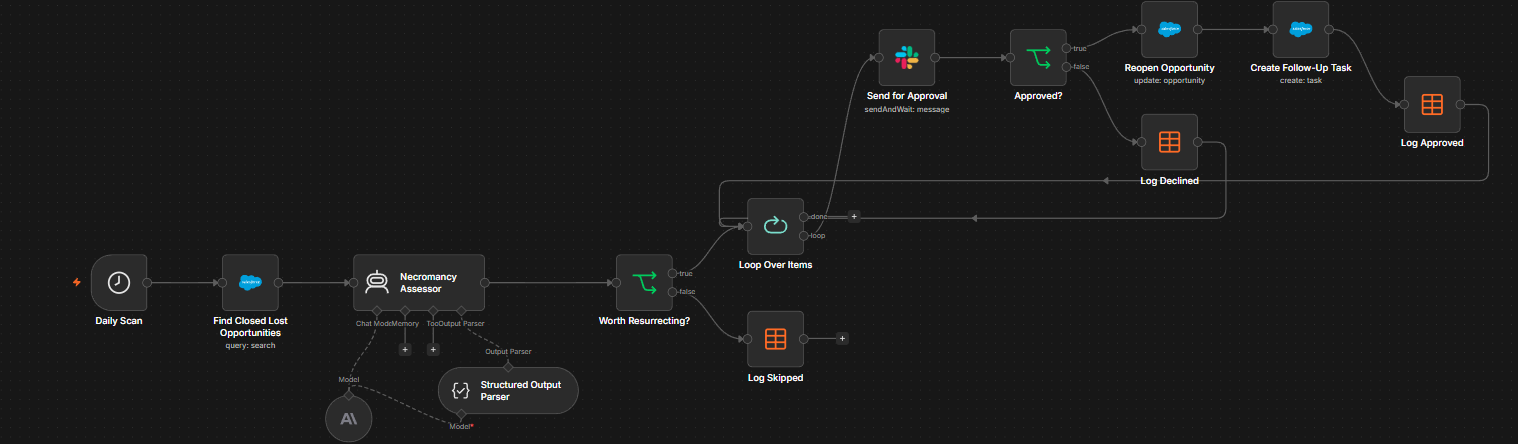
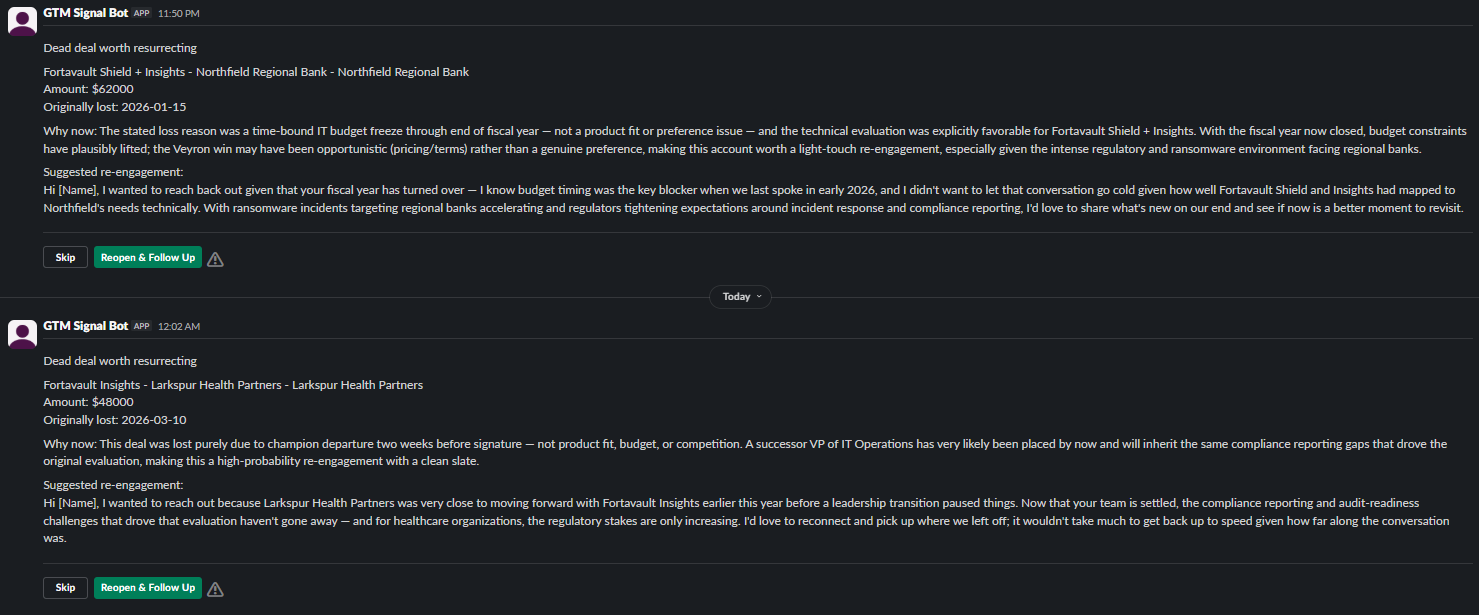
A daily scheduled scan queries Salesforce for every Closed Lost opportunity. Claude reviews each one against its stated loss reason and how much time has passed, deciding whether it's worth re-engaging — deliberately instructed to be selective, since most closed-lost deals shouldn't be resurrected. For anything flagged worth resurrecting, Claude drafts a short re-engagement angle grounded in real Fortavault products and competitive positioning, then the workflow sends an interactive Slack approval message for that one deal — reopen it, or skip it.
On approval, the opportunity is reopened in Salesforce (moved back to Qualification, close date pushed out 90 days), a high-priority follow-up task is created with the drafted angle as the task description, and every decision — approved, declined, or skipped — is logged to an n8n Data Table for a full audit trail. When a run flags more than one deal at once, each gets its own independent Slack approval cycle in sequence rather than being bundled into a single wait — a real bug I hit and fixed mid-build, after the first multi-deal run silently dropped the second approval.
Assessor System Prompt
Same Fortavault context as above, with a different job: be skeptical by default, and only surface deals with a genuine, time-sensitive reason to revisit.
Live Run
Impact (measured from live runs)
Support Triage That Knows Who's Asking
~3 min read
An inbound support email gets read by Claude, matched to the right Salesforce account, and either escalated, routed, or quietly queued depending on who sent it and how urgent it actually is.
Support Triage That Knows Who's Asking
~3 min readAn inbound support email gets read by Claude, matched to the right Salesforce account, and either escalated, routed, or quietly queued depending on who sent it and how urgent it actually is.
The Problem
Most support triage treats every inbound ticket the same way: same queue, same SLA clock, same Slack noise, regardless of whether it's a trivial question from a small account or a fleet-wide outage at an enterprise customer mid-renewal. That flattening cuts both ways — teams either over-alert on things that don't matter, or bury a genuinely urgent ticket from a top account in the same pile as a "how do I export this" question.
The Build
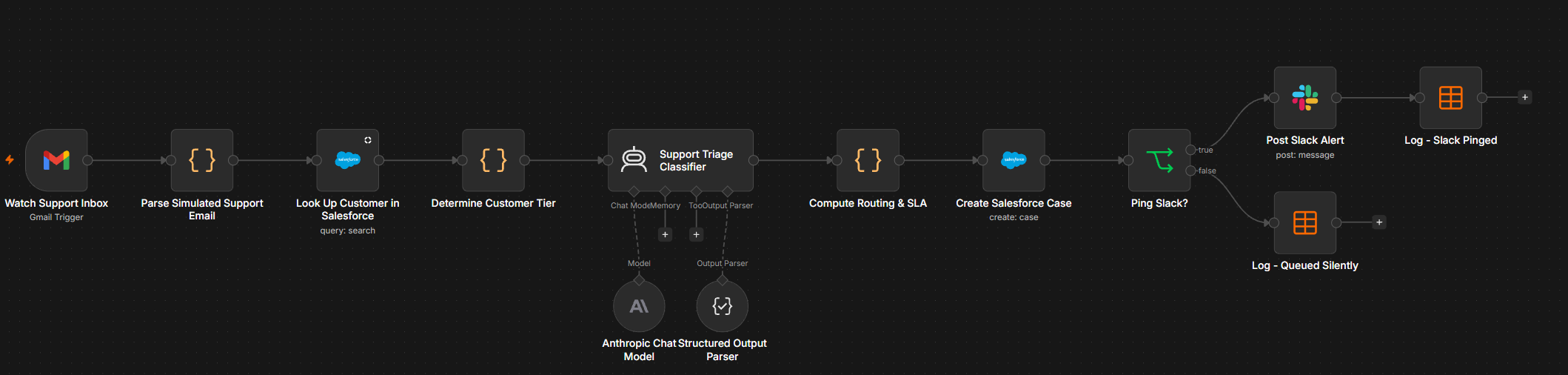
There's no live customer support inbox connected for this sprint, so the trigger is a scoped Gmail watch that only fires on test emails carrying a demo subject tag — a stand-in for a real support alias. Everything after that runs live: a real Salesforce lookup, a real Claude call, a real Case, a real Slack message. When a matching email lands, a Code node parses out the sender's stated email and the message body, then Salesforce is queried for a matching Contact. If one exists, the linked Account's AnnualRevenue determines a customer tier — Enterprise, Mid-Market, or SMB — computed from real seeded Salesforce data, not a hardcoded label.
Claude reads the email and classifies it on two axes: category (Security
Incident, Technical Issue, Billing/Account, or Feature Request/General)
and priority (Urgent/High/Normal/Low), grounded in Fortavault's product
line so it can tell a real outage report from a feature ask. A routing
step then combines category, tier, and Claude's priority into the
routing decision: a Security Incident always escalates immediately regardless of
tier; an Enterprise account with an urgent issue gets a 1-hour SLA and an
@here Slack ping; a low-priority ticket from a small account
gets a 2-business-day SLA and no Slack ping at all — it's logged and
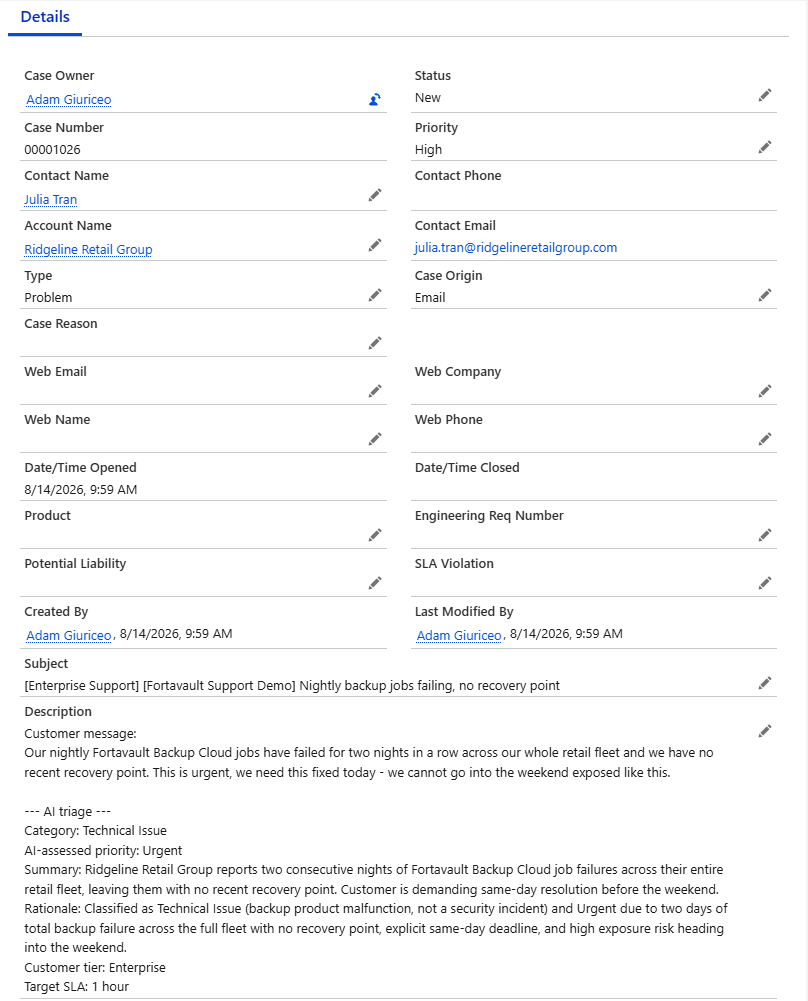
queued, not dropped. Every ticket gets a real Salesforce Case created
either way, and every decision is logged to a Data Table for an audit
trail of what got escalated, what got queued, and why.
Routing Logic
Category, tier, and priority don't just stack — they interact:
A Bug Found in Review: Only the First Email Got a Case
A later review of this build caught a real gap. The Gmail trigger can pick up as many as five matching emails in one check, but two of the Code nodes only read the first item they were handed, so if several tickets arrived together, only the first became a Salesforce Case. The fix matches every parsed email to its own Salesforce contact by address and runs the routing rules once per email. A test with two emails in a single check (one from an Enterprise contact, one from an unknown sender) produced two separately routed Cases: Enterprise Support with a one-hour SLA and an @here ping, and a quiet Self-Serve queue entry.
Live Run

Impact (measured from live runs)
Finding Your Champions When They Change Jobs
~3 min read
A rep confirms a past champion's new employer, Claude pulls their deal history from Salesforce and drafts a re-engagement angle, and a Slack approval turns it into a new Salesforce Opportunity.
Finding Your Champions When They Change Jobs
~3 min readA rep confirms a past champion's new employer, Claude pulls their deal history from Salesforce and drafts a re-engagement angle, and a Slack approval turns it into a new Salesforce Opportunity.
The Problem
A champion who bought from you doesn't stop being a champion when they change jobs — but nobody tracks that. The rep who closed them moves on to new pipeline, the contact record goes stale in Salesforce, and a warm relationship with someone who already knows the product's value just evaporates instead of turning into a new deal at their new company.
The Build
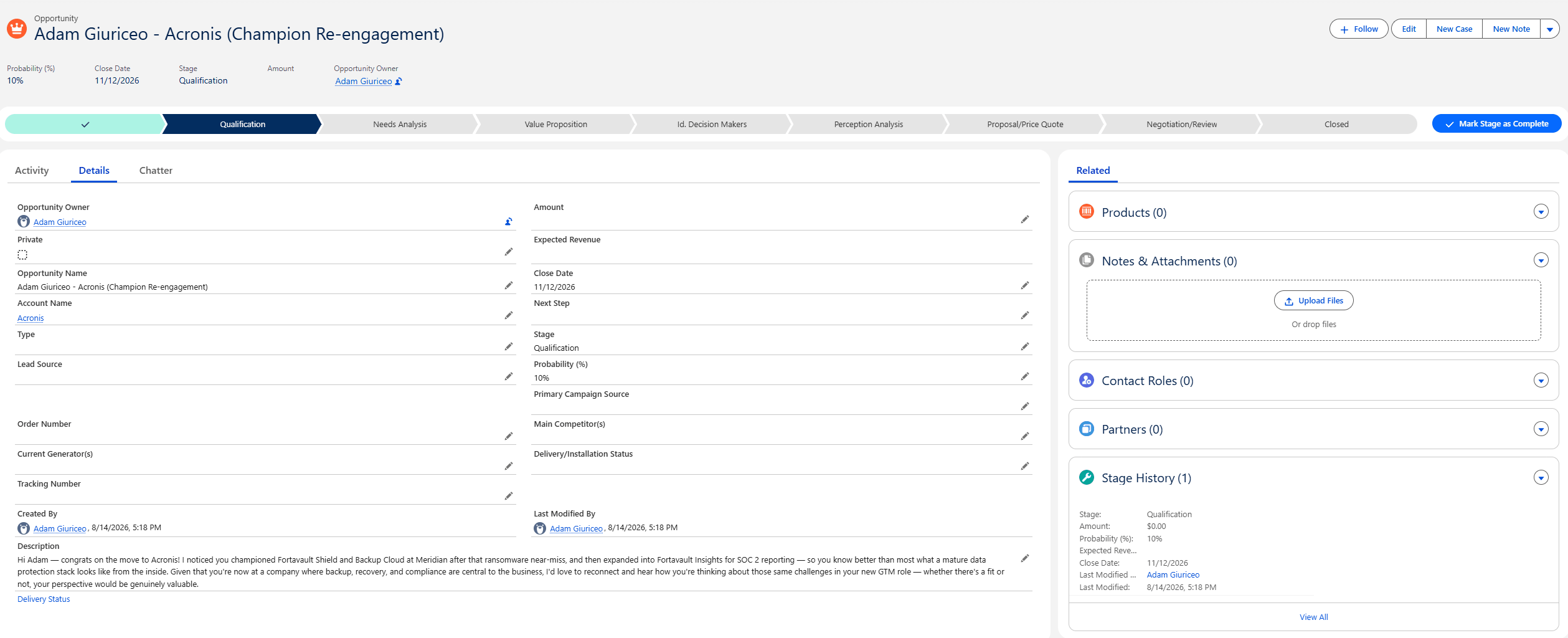
This one is honest about where the automation boundary actually sits. Clay is genuinely useful here — Claygent can research a contact's current employer far better than I could script by hand — but Clay's free tier doesn't include webhook or HTTP API access, so there's no way to have Clay call back into n8n automatically. Rather than fake that part, I built the real boundary into the workflow: a rep runs an actual Claygent lookup in Clay's UI on a champion from the roster, then submits what it finds through an n8n form. Everything from that submission onward is fully live and automated.
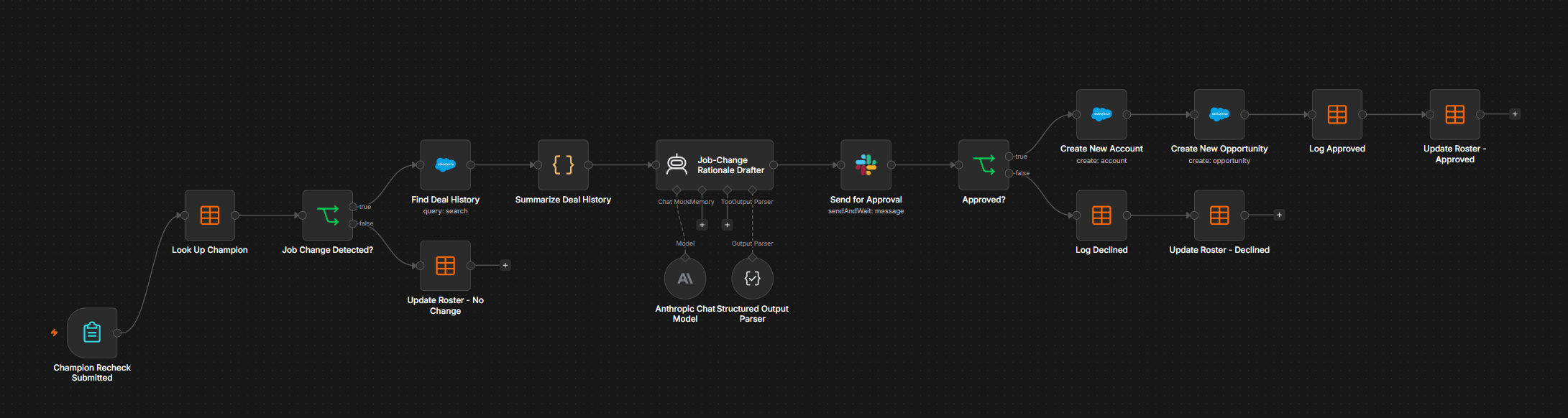
The form hand-off triggers a lookup against a Champion Roster Data Table, and a check for whether the submitted company actually differs from the champion's last known employer. If it does, n8n queries Salesforce for that champion's real deal history at their old company, and Claude drafts two things grounded in that history: a private rationale for the rep on why this contact is worth pursuing again, and a re-engagement opener referencing their specific prior products and the reason to talk now. That goes to Slack as an interactive approval — create the opportunity, or skip it. Approving it creates a real Salesforce Account and Opportunity for the champion's new company, with Claude's drafted angle written into the Opportunity description. Every outcome, approved or declined, is logged to a Data Table, and a separate Recheck Reminder workflow can post a daily 7am Slack nudge for each champion on the roster to go run the next Clay lookup, since nothing here can check automatically (it's switched off between test runs).
Rationale Drafter System Prompt
Same Fortavault context as above, with a different job: decide whether a champion is worth pursuing at their new company, and draft the opener a rep could actually send.
A Real Drafted Email
This is the actual reengagementAngle Claude wrote during a
live run, unedited, after a real Clay lookup found that the test champion (my own profile, carrying seeded Meridian Financial Group deal history) had moved to Acronis:
Where This Is Honestly Limited
Clay's free tier has no webhook or API automation, which means this workflow cannot continuously monitor champions for job changes on its own — that requires Clay's paid Growth plan. What's built instead is the most honest version achievable on a free trial: real Claygent research, real Salesforce and Claude and Slack automation for everything downstream of that lookup, and a scheduled Slack reminder that nudges a rep to go run the next check manually rather than pretending a free tier can do something it can't. One more thing worth saying plainly: Fortavault's contacts are fictional, so Clay has no real job history to find for them. The roster's test champion is therefore my own profile. The move to Acronis is a real Clay result; the Meridian Financial Group deal history behind it ($107K across two Closed Won deals) is seeded demo data in Salesforce.
Live Run

Impact (measured from live runs)
Fixing MAP-CRM Discrepancies
~3 min read
A daily sentinel catches contacts whose HubSpot lifecycle stage disagrees with Salesforce reality, drafts a plain-English explanation with Claude, and waits for a Slack approval before touching HubSpot.
Fixing MAP-CRM Discrepancies
~3 min readA daily sentinel catches contacts whose HubSpot lifecycle stage disagrees with Salesforce reality, drafts a plain-English explanation with Claude, and waits for a Slack approval before touching HubSpot.
The Problem
The marketing automation platform and the CRM drift out of sync constantly, in both directions. A contact stays "Lead" in HubSpot for weeks after Sales closes the deal in Salesforce, so they keep getting top-of-funnel nurture emails they've already outgrown. Or a contact gets marked "Customer" in HubSpot off some internal note or a deal that later fell through, with no actual Closed Won opportunity backing it up in Salesforce. Either way, lifecycle reporting quietly goes wrong and nobody notices until a QBR number doesn't add up.
The Build
A daily scheduled scan pulls every HubSpot contact, then for each one queries Salesforce with a single SOQL call — an Account lookup matched by email domain, with a nested subquery pulling that account's Opportunities in one round trip instead of two. A Code node runs the actual comparison deterministically rather than leaving it to the LLM: it checks for a real Closed Won opportunity against the contact's current HubSpot stage and flags one of two mismatch types — HubSpot behind (any stage short of Customer despite a Closed Won deal) or HubSpot ahead (Customer with no Closed Won opportunity, including the case where there's no opportunity on the account at all).
Flagged contacts are processed one at a time through a batch loop — after a real bug where a run with two discrepancies only sent a Slack approval for the first contact and silently dropped the second when the execution completed. Fixed by wrapping the approval step in a one-item-at-a-time loop with an explicit loop-back after every outcome, approved or skipped, so each contact gets its own Claude explanation and its own interactive Slack message before the next one is even drafted. Approving a fix writes the corrected lifecycle stage to HubSpot and logs the previous stage, the corrected stage, the reason, and the matched Salesforce account to a Data Table for a full audit trail.
Draft Discrepancy Explanation Prompt
Same Fortavault context as the other builds, with a narrow job: turn a raw stage/reason mismatch into something a RevOps teammate can approve in Slack without having to decode field names.
A Real HubSpot API Limit I Hit Mid-Build
The first live run fixed one contact correctly but silently failed on the other — same code, same approval, same "success" response from HubSpot, but the property never actually changed. Chasing it down led to a genuine HubSpot platform limit: the API refuses to move a contact's lifecycle stage backward (Customer → Opportunity, say), full stop, on every write path — the legacy contacts API and the v3 CRM API alike. It doesn't error. It returns HTTP 200 and just doesn't apply the change, which is worse, because a Slack approval shows "done" over a record that never moved. I only caught it by re-reading the contact fresh from HubSpot after the fact instead of trusting the node's own response — which is now standard practice for me on anything that writes.
The fix, confirmed with a raw API call before touching the workflow: clear the property to blank in one PATCH call, then set the corrected stage in a second PATCH call. HubSpot allows any value once the field has no current stage to protect. The two HTTP Request nodes below replaced what had been a single HubSpot node upsert, and both stage directions — Lead → Customer and Customer → Opportunity — now apply for real, verified against a fresh HubSpot read after every approval.
Live Run


Impact (measured from live runs)
Catching a Funnel Leak Before It Craters the Quarter
~3 min read
A rolling two-proportion z-test flags a real win-rate drop in Salesforce, and Claude traces it back to the actual pricing change buried in the loss notes instead of a vague "conversion is down."
Catching a Funnel Leak Before It Craters the Quarter
~3 min readA rolling two-proportion z-test flags a real win-rate drop in Salesforce, and Claude traces it back to the actual pricing change buried in the loss notes instead of a vague "conversion is down."
The Problem
Most funnel dashboards can tell you conversion dropped; almost none can tell you why, and a bare percentage swing shown to a sales leader is not an action item. Worse, small day-to-day wobble in a pipeline gets mistaken for a real problem constantly — someone eyeballs a chart, sees a dip, and fires off an all-hands alarm over what turns out to be ordinary noise. Both failure modes come from the same root cause: nothing is actually testing whether a swing is statistically real before asking a human to explain it.
The Build
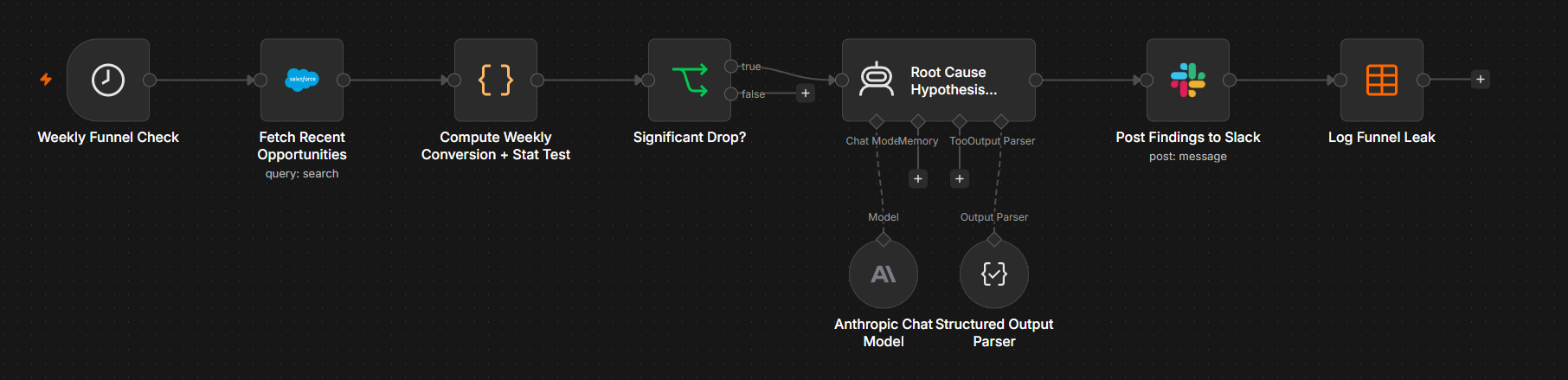
This one is deliberately single-system — Salesforce only, no
HubSpot or Clay layered in — because the whole point is that the
statistics, not another data source, are what make the alert
trustworthy. A weekly scan pulls every Closed Won and Closed Lost
opportunity from a scoped set of accounts, and a Code node computes a
rolling win rate: the last two weeks against a trailing six-week
baseline. Whether the drop is real is answered by an actual
two-proportion z-test, computed by hand in JavaScript (pooled
proportion, standard error, a from-scratch erf
approximation for the normal CDF) — not an LLM eyeballing a
chart and not a third-party stats library. Deciding "is this
significant or just noise" is exactly the kind of question that should
be deterministic math, not a model's judgment call.
Only when the drop clears p < 0.05 does the workflow hand off to Claude, and only with the specific evidence that matters: the real loss notes from the Closed Lost deals inside the flagged window, not the whole book of business. Claude's job is narrow — find the actual pattern in those notes, name it explicitly if multiple deals cite the same cause, and separate it from losses that are just normal deal risk — then draft a plain-English hypothesis and a concrete next action. That goes to Slack, and every flagged run's stats and hypothesis are logged to a Data Table for a trend line over time; a run with no significant drop ends quietly.
The Statistical Test
The significance check itself, unedited from the live workflow — this is what decides whether Claude ever gets involved:
Root-Cause Drafter System Prompt
Same Fortavault context as the other builds, with a narrow job: find the real pattern in the loss notes, don't invent one.
A Real Flagged Run
This is the actual output from a live run, unedited: win rate held around 69% for six weeks, then cratered to 25% (9 of 12 deals lost) in the most recent two-week window — a drop the z-test scored at z = −2.70, p = 0.0068. Claude was handed only the nine loss notes from that window, with no hint about what to look for:
Live Run

Impact (measured from live runs)
Scoring Anonymous Accounts Before Anyone Fills Out a Form
~4 min read
Real Clay research on real target accounts gets checked against HubSpot and Salesforce, scored by Claude for in-market likelihood, and posted to Slack only when an account is genuinely still dark.
Scoring Anonymous Accounts Before Anyone Fills Out a Form
~4 min readReal Clay research on real target accounts gets checked against HubSpot and Salesforce, scored by Claude for in-market likelihood, and posted to Slack only when an account is genuinely still dark.
The Problem
Most of the accounts worth selling to never touch a tracked channel before they're already deep into evaluating a purchase. Nobody filled out a form, nobody booked a demo, nobody signed up for a trial — so HubSpot has no contact and Salesforce has no opportunity, even though the account is actively researching, hiring for the exact roles that predict this purchase, and quietly building a shortlist. That's the "dark funnel": real buying activity that's completely invisible to a CRM built to track inbound. Sales has no way to know these accounts exist without someone manually researching a target list, and manual research doesn't scale past a handful of accounts a week.
The Build
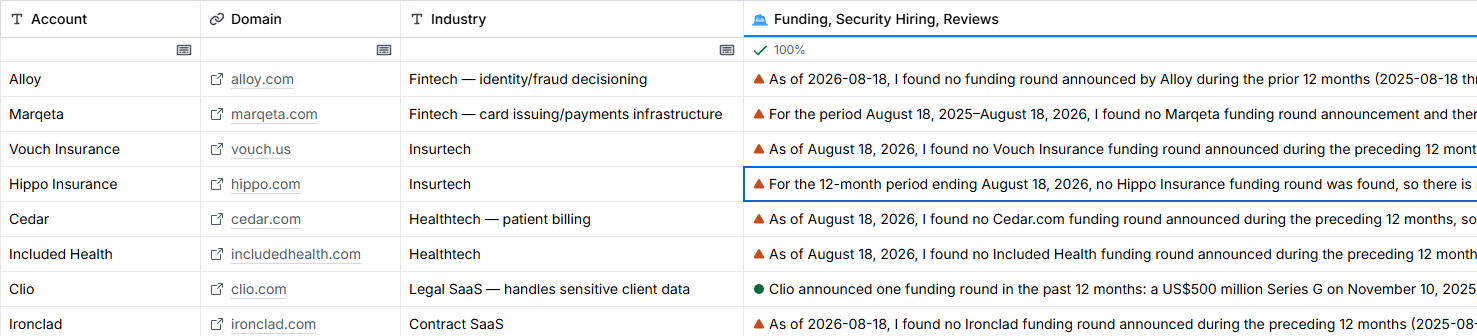
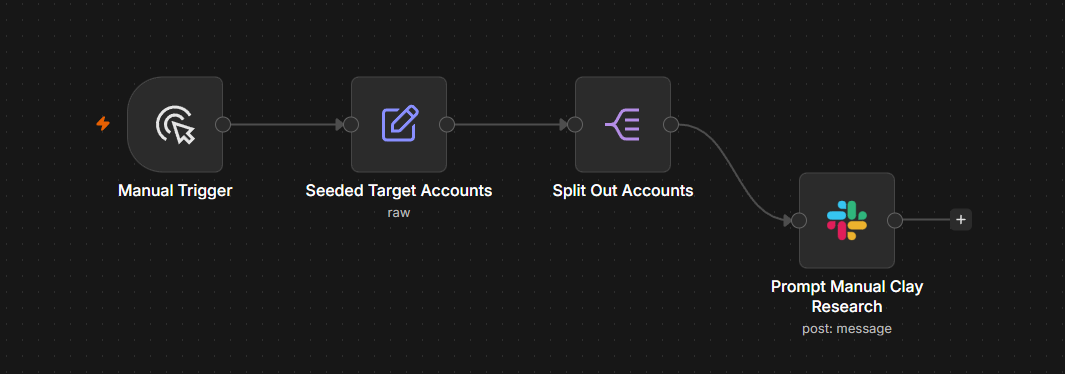
Same honesty constraint as the Champion Job-Change build: Clay's free-trial plan has no webhook or API automation, so there's no way for Clay to call back into n8n on its own. Rather than fake that, the workflow is split in two around the real boundary. Workflow A seeds a list of real target accounts (Alloy, Marqeta, Vouch Insurance, Hippo Insurance, Cedar, Included Health, Clio, and Ironclad — not placeholders; Claygent needs real companies to find anything real) and posts a Slack prompt per account asking a rep to run Claygent for funding, hiring, and review-site signals, then submit the findings through an n8n form.
Workflow B triggers on that form submission and does the part that actually has to be automated to be trustworthy. Before anything gets scored, it checks whether the account is genuinely pre-funnel — a real HubSpot company search by domain, and a real Salesforce SOQL query for that account with a nested subquery for any open opportunity. If either system already has a match, the account is logged as disqualified and the workflow stops there: no wasted Claude call, no Slack noise for an account sales already knows about. Only when both checks come back clean does Claude score the account's in-market likelihood from 0-100, grounded specifically in the Clay research signals rather than generic ICP fit. A score of 70+ posts a real nomination to Slack; every outcome, scored or disqualified, is logged to an n8n Data Table for a full audit trail.
Scoring Prompt
Same Fortavault ICP context as the other builds, with a narrow job: score the account against the actual research signals, not against optimism.
Two Real Scored Accounts
Both of these are real outputs from live runs (one excerpted where marked) — real Claygent research, submitted through the actual form, checked against the real Trailhead Salesforce org and a real HubSpot portal, and scored by Claude with no hint about what to look for beyond the raw signals:
G2 and Capterra Aren't Buyer Intent — and the Real Signal Came From Somewhere Else
The original design called the third research signal "review-site mentions" of an account evaluating security or compliance tooling. Running real research against Clio, Marqeta, and Hippo exposed that framing as imprecise, and it's worth being upfront about rather than quietly fixing in the write-up. Public G2 and Capterra reviews are opinions from people who already use the product being reviewed, about that product — not a place someone announces they're shopping for something else. Claygent's open-web search never found a review that said "we're evaluating a compliance tool." What it found instead, for both accounts above, was a competitor's own customer case-study page — Lumos for Marqeta, CyberArk for Hippo — confirming a real, recent identity-governance purchase. That's a genuinely useful signal; it just isn't the one the field name implied.
The product that actually captures "is this account researching a software category right now" is G2 Buyer Intent (Capterra, Software Advice, and GetApp were folded into G2 after its acquisition of them from Gartner). It tracks account-level browsing behavior on G2's own site — who's viewing a category page, comparing vendors, reading competitor profiles — and sells that as a paid, licensed data feed. It isn't visible through public search, and no amount of open-web research, Claygent included, can see it.
Where This Is Honestly Limited
Two constraints shaped what actually got built here, and both are worth naming instead of glossing over. First, the same one as the Champion Job-Change build: Clay's free tier has no webhook or API layer, so the intended fully-automated loop — n8n pushes accounts into Clay, Claygent researches them, Clay calls back on its own — isn't possible on this plan. What's built instead is the most honest version achievable: real Claygent research, real HubSpot/Salesforce/Claude/ Slack automation for everything downstream of that lookup, and a manual hand-off in between. Second, without licensed access to G2 Buyer Intent, the "review mentions" signal is open-web inference rather than a real intent feed — useful when it surfaces something like the Lumos or CyberArk case studies above, but not a substitute for actual account-level browsing data.
With full Clay API/webhook access, Workflow A and B collapse back into one fully automated loop with zero human touch, and the seed list stops being a small hand-picked batch of eight — it could run nightly against a much larger, continuously refreshed target list. With G2 Buyer Intent access, the review-mentions signal becomes a real structured feed (which categories an account is researching, page-view volume, competitor-comparison views) instead of open-web guesswork, strong enough to weight more heavily in Claude's prompt than it currently does. It also changes what starts the workflow in the first place: instead of scoring a list someone curated by hand, an intent spike on a relevant category could be the trigger — nominating accounts because they just started researching compliance software, not because they happened to be on a seed list. That's the same real-time-detection idea Day 17's Intent Signal Monitor applies elsewhere in the sprint, showing up here too.
Live Run


Impact (measured from live runs)
Retroactively Tying Event Leads to Revenue
~3 min read
A weekly scan matches Closed Won Salesforce deals back to the trade-show badge scan that started them, computing true time-to-close and per-event ROI instead of a same-day guess.
Retroactively Tying Event Leads to Revenue
~3 min readA weekly scan matches Closed Won Salesforce deals back to the trade-show badge scan that started them, computing true time-to-close and per-event ROI instead of a same-day guess.
The Problem
Event ROI almost always gets measured on the day the booth closes — badge scans collected, leads entered, a same-day estimate built on pipeline that hasn't actually gone anywhere yet. That number is fiction. The real payoff, if there is one, shows up months later when a badge scan either turns into a Closed Won deal or quietly dies, and by then nobody's still connecting that revenue back to the event that started it. So budget gets allocated on vibes and booth-traffic counts instead of on which events actually produced closed revenue.
The Build
This one stays deliberately single-system — Salesforce and Slack only, in the tradition of Days 5, 9, and 13 — because the whole point is retroactive, not real-time: a scheduled scan looks backward at deals that have already closed and reconnects them to where they started. Three mock events were seeded into Salesforce (SecureOps Summit 2025, CloudGuard Conference 2025, DataProtect World 2026), each with a badge-scan date and a handful of resulting Opportunities — some Closed Won anywhere from seven weeks to nine months later, plus a couple of Closed Lost and one still-open deal for realism, since a badge scan converting every time would be its own kind of fake.
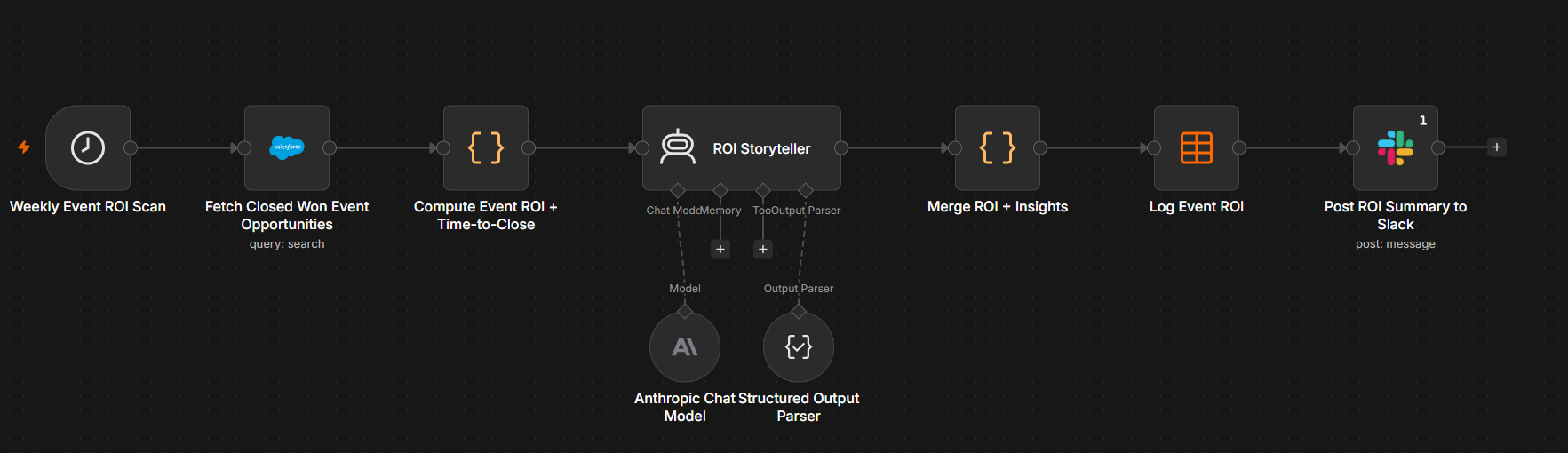
A weekly scan pulls every Closed Won opportunity tied to those seeded accounts, and a Code node does the actual math deterministically: it parses the event name and badge-scan date back out, computes real days-to-close per deal, and rolls that up per event — deal count, total revenue, average/min/max time-to-close, and ROI against that event's cost. Only after the numbers are computed does Claude get involved, and only to do what a spreadsheet can't: compare the three events directly, explain whether speed-to-close or deal size is actually driving the ROI difference, and recommend where to put next quarter's event budget. The full breakdown posts to Slack, and every event's stats and Claude's per-event insight get logged to a Data Table for a trend line across future events.
A Real Salesforce Limit I Hit Mid-Build
The plan was to tag event-sourced opportunities with
Lead Source: Trade Show, the standard Salesforce value for
exactly this case. This Trailhead Playground's Opportunity
LeadSource picklist turned out to be restricted to just
five values — Other, Partner Referral, Phone Inquiry,
Purchased List, Web — with no Trade Show or Event option, and
no standard field for a badge-scan date at all. Rather than force a
write that Salesforce would reject, the workflow sets
LeadSource: Other and encodes the real event name and
badge-scan date as structured text in the Description field
(Event Source: SecureOps Summit 2025 | Badge Scan Date:
2025-11-04), then parses it back out with a regex in the Code
node. The same pattern the Funnel Leak build used for loss-reason notes, applied here
because the platform's actual constraints, not the original plan, are
what the build has to work around.
Time-to-Close + ROI Calculation
The core of the Code node, unedited from the live workflow — this is what turns a badge-scan date and a close date into a real, per-event ROI number:
ROI Storyteller System Prompt
Same Fortavault context as the other builds, with a narrow job: compare the events on their real numbers and turn that into a budget recommendation, not a restatement of the stats.
A Real Run
This is the actual output from a live run, unedited — seven Closed Won deals across three events, with time-to-close ranging from 48 days to 271 days after the original badge scan:
One factual slip survives in that output: Claude calls Wexford Legal Group's 77 days the joint-fastest deal, but DataProtect World's fastest deal closed in 48. The per-event numbers the workflow computes are right; the narration got one comparison wrong, which is exactly why the ROI math lives in code and Claude only explains it.
Live Run

Impact (measured from live runs)
The Battlecard That Updates Itself
~4 min read
A weekly scan cross-references simulated competitor signals against real Salesforce Closed Lost deals, has Claude draft the battlecard update, and only logs it once a human approves it in Slack.
The Battlecard That Updates Itself
~4 min readA weekly scan cross-references simulated competitor signals against real Salesforce Closed Lost deals, has Claude draft the battlecard update, and only logs it once a human approves it in Slack.
The Problem
Battlecards rot the moment they're written. A rep loses a deal to a named competitor, the loss reason gets typed into a CRM field, and then nothing happens — the positioning doc a different rep reads before their next call still says whatever it said last quarter. Nobody's job is to notice that a competitor just changed pricing, or that the same competitor has quietly shown up in three real losses in a row. The update only happens when someone remembers to go looking, which is to say rarely.
The Build
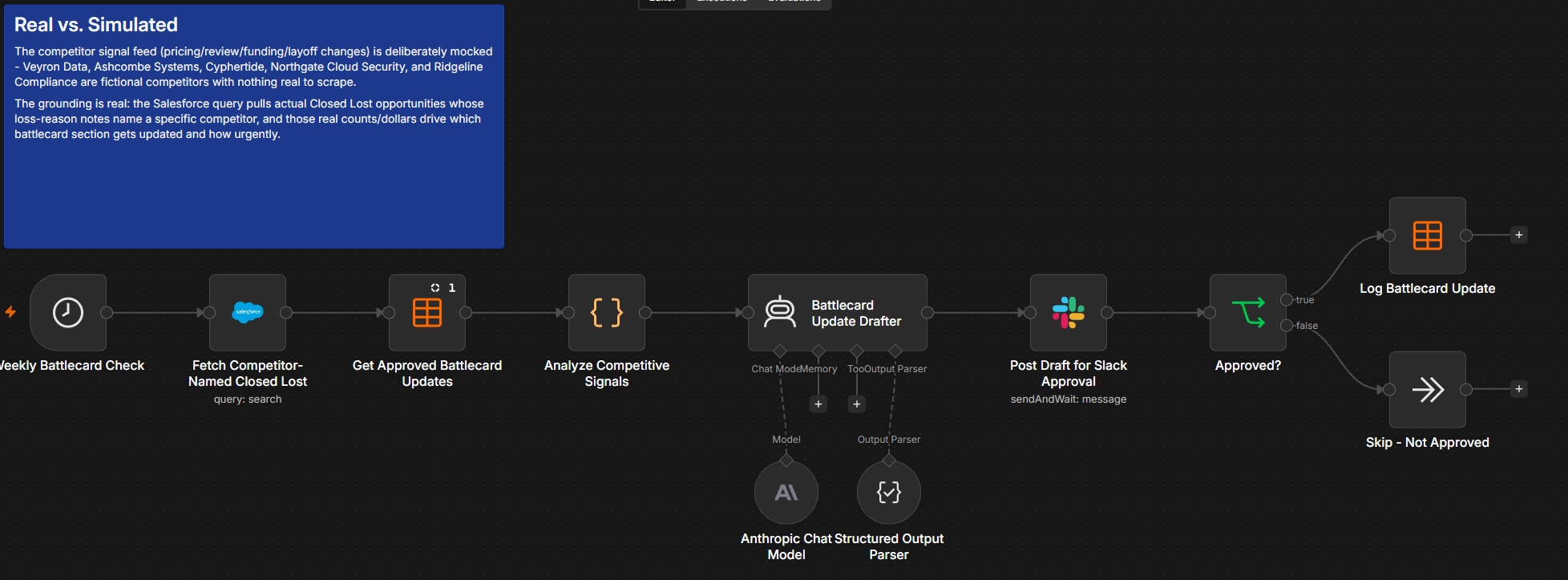
Fortavault's five competitors (Veyron Data, Ashcombe Systems, Cyphertide, Northgate Cloud Security, Ridgeline Compliance) are fictional, so there's no real pricing page or funding announcement to scrape — a mock signal feed stands in for that: one simulated pricing, review-sentiment, funding, positioning, or layoff signal per competitor, each with a fixed weight. What's real is everything downstream of it. A weekly scheduled run pulls every Closed Lost opportunity out of Salesforce, and a Code node matches each one's loss-reason notes against the five competitor names, tallying real loss counts and real dollar totals per competitor. Each real loss adds 3 points to that competitor's mock signal weight to give an urgency score (the dollar totals go to Claude as context, not into the score), and whichever competitor scores highest — not whichever the workflow author feels like — is the one that gets its battlecard section rewritten this cycle.
Only the top-scoring competitor's signal, real loss summary, and current battlecard text get handed to Claude, which drafts a revised positioning paragraph and objection-handling paragraph grounded specifically in the real losses it was given — explicitly instructed not to invent a loss pattern that isn't in the data. The draft posts to Slack as an approval request, and the battlecard only actually updates — written to a Data Table that's the system of record for the current positioning — if a human clicks Approve. Skip it, and nothing changes; the current text stands until the next cycle finds a better reason to touch it.
Real vs. Simulated
The competitor signal feed is deliberately mocked — there's nothing real to scrape for a fictional company's fictional rivals. The grounding is real: the Salesforce query pulls actual Closed Lost opportunities, and the real count of losses naming each competitor in their loss-reason notes is what decides which competitor's battlecard gets touched and how urgently, not an assumption baked into the workflow.
A Real Salesforce Limit I Hit Mid-Build
The original plan was to filter the SOQL query itself — pull only
Closed Lost opportunities whose Description mentions one
of the five competitor names, right in the WHERE clause. Salesforce
rejected it: Description is a long text area field, and
those can't be used in a WHERE or LIKE filter at all — a
real SOQL restriction, not a permissions issue. The fix was to stop
trying to filter server-side: the query now pulls the 200 most recent Closed Lost opportunities with no competitor filter, and the Code node does the competitor-name
matching client-side with a plain substring check against
Description. The same shape as the Funnel Leak and Event ROI builds' workarounds — when Salesforce won't let you filter on a field,
pull broader and filter after.
Battlecard Update Drafter — System Prompt
This is the exact system prompt sent to Claude for the drafting step, unedited from the live workflow. An early version left the output format unconstrained and Claude wrote multi-paragraph, markdown-heavy copy that blew past Slack's block character limit (see below) — this version explicitly locks down length, tone, and structure (on the live run below Claude still overshot the 500-character cap by a few words, so the Slack message also trims each field at 500 characters as a backstop):
Battlecard Update Drafter — User Prompt Template
Built from the Code node's output, so every number in it is real: the competitor name, the signal, and the actual loss count and dollar total pulled from Salesforce that cycle.
A Real Slack Limit I Hit Mid-Build
The first live run's approval post failed outright with an
invalid_blocks error — Slack's Block Kit caps a
single section's text at roughly 3,000 characters, and an
unconstrained draft from Claude (headers, bold, numbered lists, several
paragraphs) blew past it. Fixed two ways: tightened the system prompt
above to mandate plain prose under 500 characters per field, and added
a defensive .slice(0, 500) / .slice(0, 220)
directly in the Slack message expression as a backstop regardless of
whether the model actually complies.
A Real Run
This is the actual draft from a live run, unedited. Out of all five competitors, Northgate Cloud Security scored highest — urgency 12, against Ashcombe Systems at 11, Veyron Data at 8, Cyphertide at 5, and Ridgeline Compliance at 1 with zero real losses — driven by 3 real Closed Lost opportunities naming Northgate, totaling $171,775:
A Gap Found in Review: Approvals Weren't Read Back
The first version logged every approved rewrite but never read that log again: each week's draft started from the original hard-coded battlecard text, so an approval didn't change what the next cycle worked from, and the title overstated it. A review of this write-up caught the gap. The workflow now reads the Battlecard Update Log before scoring and uses the latest approved positioning and objection handling for each competitor as its current text. A test run confirmed the next Northgate draft now starts from the version approved on August 31, and the approval message says where the current text came from.
Live Run

Impact (measured from live runs)
The Slack Deal Room Concierge
~3 min read
When a real Salesforce deal crosses into Negotiation/Review, n8n spins up a dedicated Slack channel with live deal context — and when it closes, Claude summarizes the room's actual activity before archiving it and logging the outcome.
The Slack Deal Room Concierge
~3 min readWhen a real Salesforce deal crosses into Negotiation/Review, n8n spins up a dedicated Slack channel with live deal context — and when it closes, Claude summarizes the room's actual activity before archiving it and logging the outcome.
The Problem
Deal-specific Slack channels are useful right up until they aren't: someone spins one up by hand once a deal gets serious, names it whatever felt right that day, and forgets to archive it when the deal closes. Six months later the workspace is full of stale #big-deal-copy channels nobody remembers the outcome of, and the context that actually mattered — why it closed, what almost killed it — just evaporates along with the channel instead of getting captured anywhere.
The Build
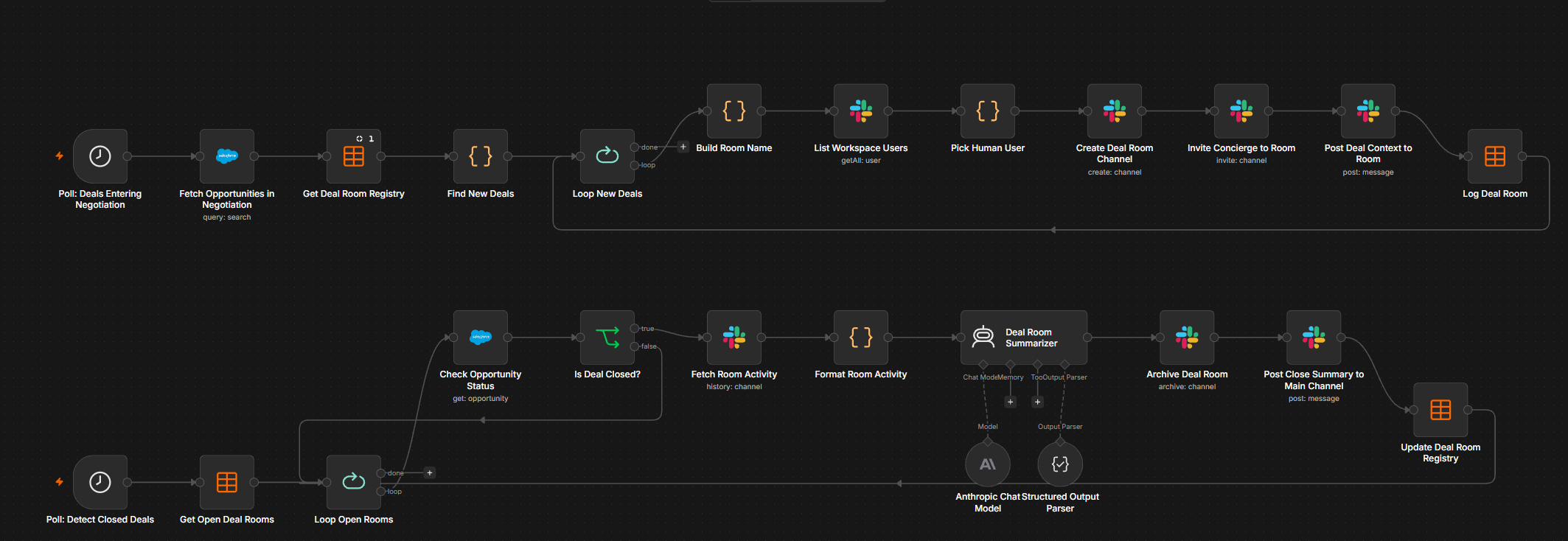
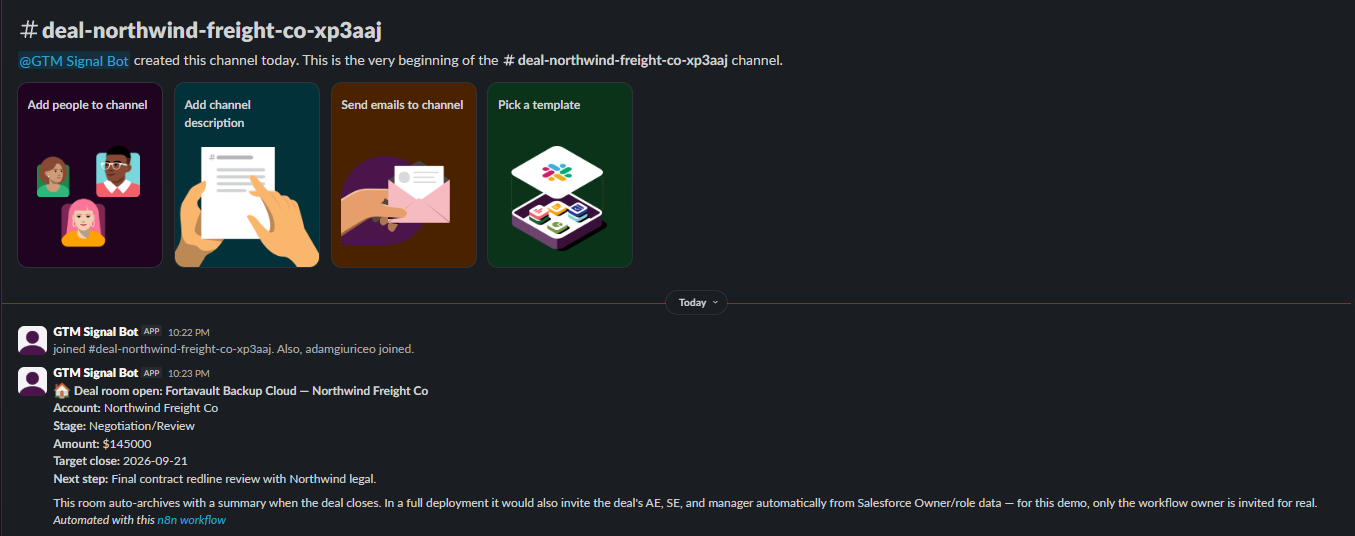
Two independent scheduled polls, tied together by one Salesforce opportunity ID. The first checks hourly for opportunities that have reached Negotiation/Review and aren't already tracked in a Deal Room Registry Data Table — the registry is both the dedup guard, so a deal already in flight doesn't get a second channel next hour, and the audit trail the brief asked for. A new deal gets a channel name built from the account and opportunity ID, a real Slack channel created for it, and a deal-context message posted with the amount, stage, target close date, and next step pulled straight from Salesforce.
The second poll runs hourly, at half past the hour, against every row the registry still has marked open, re-checking that opportunity's live Salesforce status. The moment one comes back closed, n8n pulls that channel's real Slack message history, hands it to a Claude agent with structured output to write a plain-English recap of what actually happened in the room, archives the channel for real, posts the recap to a shared team channel, and updates the registry row with the outcome and summary.
Real vs. Simulated
Every step that touches Salesforce or Slack is real: real opportunity data, a real channel created and later really archived, a real Claude summary grounded in the real message history of that specific channel. The one deliberate simplification is who gets invited — a production version would pull the deal's AE, SE, and manager from Salesforce Owner/role data and invite all of them for real. Fortavault doesn't have distinct real reps behind these seeded opportunities, so the workflow invites only its own owner for real and names the rest as simulated directly in the message it posts into the channel, rather than quietly faking additional invites. For this demo the room-creation query is also scoped to the two seeded deal-room accounts, so the third seeded deal (Cordwainer, still at Proposal) was outside the query rather than screened out by the stage filter.
A Real n8n Bug: Flat, Not Nested, Slack API Response
The channel-creation step returns Slack's API response completely
flat — { id, name, ... } — not nested under a
.channel key the way a couple of other Slack resources
are. I wrote all three downstream references (the invite step, the
deal-context post, and the registry log row) pointing at
.channel.id, which silently evaluated to
undefined every time. Slack rejected the invite call
with invalid_arguments, the context message posted to
whatever undefined coerced to, and the registry logged an
empty channel ID — three broken values traced back to one wrong
assumption about the response shape, fixed once I actually inspected
the raw node output instead of trusting my memory of it. (Two real
channels had already been created against this bug before it was
caught; rather than risk a Slack name_taken error by
recreating them, I patched each one's remaining steps against its
already-existing channel ID and backfilled its registry row by hand.)
A Real n8n Bug: Salesforce's Boolean Rejected by Strict Type Validation
The close-detection IF node checks the opportunity's
IsClosed field against Salesforce — a field that
comes back as a genuine JSON boolean. With the IF node's default
strict type validation, n8n still threw
Wrong type: '' is a string but was expecting a boolean,
because the boolean operator's unused right-hand comparison value
defaults to an empty string, and strict mode wouldn't reconcile that
default against the operator's declared type. Switching that one
condition to loose type validation fixed it outright — a
reminder that n8n's strict mode can trip over its own placeholder
defaults, not just genuinely mismatched data.
A Real Close, Summarized by Claude
This is the unedited output from a live run: the Halberd Insurance Partners deal really closed Won in Salesforce, and Claude wrote this recap from the real Slack message history of its deal room before the channel was archived:
Live Run
Impact (measured from live runs)
The Renewal Health Storyteller
~3 min read
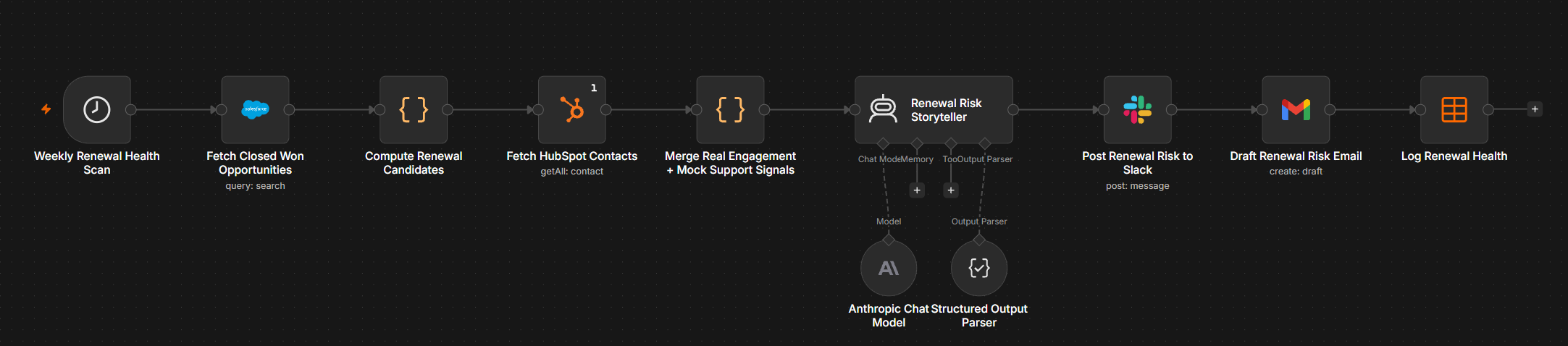
A weekly scan finds real Salesforce accounts nearing renewal, pulls their real HubSpot engagement history, layers in simulated support and stakeholder signals, and has Claude write a plain-English "why this account is at risk" narrative — posted to Slack with a matching Gmail draft ready to send.
The Renewal Health Storyteller
~3 min readA weekly scan finds real Salesforce accounts nearing renewal, pulls their real HubSpot engagement history, layers in simulated support and stakeholder signals, and has Claude write a plain-English "why this account is at risk" narrative — posted to Slack with a matching Gmail draft ready to send.
The Problem
A renewal dashboard that just says "renews in 16 days, health score: 62" doesn't tell a rep anything they can act on. It doesn't say whether the risk is that nobody at the account is opening emails, that support tickets are piling up, or that the champion who signed the deal quietly left. Without the actual story behind the number, every renewal gets the same generic check-in email regardless of what's really going on — or worse, gets no attention until it's already too late to fix.
The Build
Every Monday at 8am, the workflow pulls every real Closed Won opportunity out of Salesforce, groups them by account, and for each account finds the anniversary of its earliest closed deal — the actual renewal date. Any account whose renewal falls within the next 60 days becomes a candidate, carrying its real contract value and full real deal history. Separately, it pulls every real contact currently in HubSpot, once, with their actual tracked engagement properties (page views, email opens, email clicks, last-touch timestamps), and matches them to each candidate account by company name.
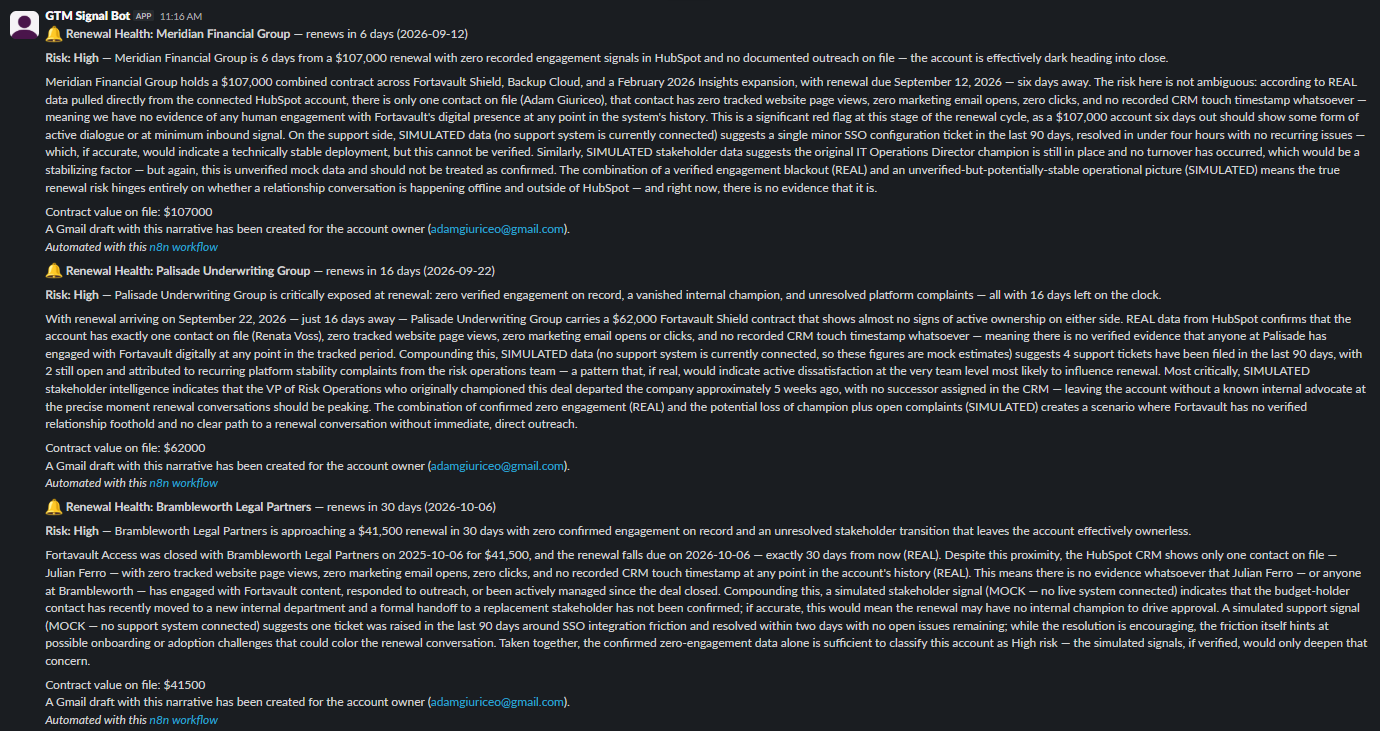
That real engagement read is then combined with simulated support and stakeholder-turnover signals — standing in for ticketing and org-chart systems Fortavault doesn't actually have connected — and handed to a Claude agent with structured output. The agent is instructed to write a specific, evidence-grounded narrative rather than a vague "engagement has dropped," and to explicitly flag which claims in its own narrative rest on real data versus simulated data. The result gets posted to Slack, turned into a real Gmail draft addressed to the actual deal owner, and logged to a Renewal Health Data Table for audit history.
Real vs. Simulated
The renewal math is entirely real: real Salesforce Closed Won opportunities, real close dates, a real computed anniversary, and real combined contract value. The HubSpot engagement read is also entirely real — and it turned up something worth being honest about rather than papering over: this is a fresh HubSpot trial with no real marketing-email history yet, so every one of the three flagged accounts came back with zero tracked page views, zero opens, and zero clicks. Rather than fabricate a plausible-looking "engagement declined 42%" number, the workflow reports the real, verified absence of engagement as exactly what it is — itself a legitimate signal — and the agent's prompt keeps that framed as REAL throughout. The support-ticket volume and stakeholder-turnover details are the deliberately simulated half, standing in for a support desk and an HR/org-chart feed Fortavault doesn't actually have wired up; every Slack post and Data Table row keeps the two labeled separately instead of blending them into one confident-sounding score.
A Real n8n Bug: HubSpot's Silent Credential Mismatch
Pulling HubSpot contacts failed on the first attempt with
Node does not have any credentials set for "hubspotApi"
— even though the node was correctly wired to the HubSpot App
Token credential. The cause: HubSpot's node has an
authentication parameter that defaults to
apiKey, and it silently expects a matching credential
type rather than inferring one from whatever credential is actually
attached. The credential I'd attached was real and correctly
configured; the node just never looked at it, because it was still
checking for a different authentication mode entirely. Setting
authentication: "appToken" explicitly on the node fixed
it outright — caught by pulling the raw execution error with
full node data rather than trusting the high-level failure message.
A Real Account, a Real Narrative
Meridian Financial Group is the one fully organic account in this run — a genuine Closed Won Salesforce opportunity, not something seeded for this build, with its renewal landing 6 days out. Its real HubSpot contact is Adam Giuriceo; the champion's job title in its narrative comes from the simulated turnover signal, not from HubSpot. Here's Claude's unedited narrative, grounded in that account's real engagement read plus its simulated support and turnover signals:
Live Run
Impact (measured from live runs)
The Territory Rebalancer
~4 min read
A monthly scan sizes real Salesforce territory value, checks real HubSpot engagement and the result of a real Clay enrichment attempt, then has Claude draft a specific rep-reassignment proposal that only ever takes effect after a real Slack approval — it never touches Salesforce ownership on its own.
The Territory Rebalancer
~4 min readA monthly scan sizes real Salesforce territory value, checks real HubSpot engagement and the result of a real Clay enrichment attempt, then has Claude draft a specific rep-reassignment proposal that only ever takes effect after a real Slack approval — it never touches Salesforce ownership on its own.
The Problem
Territory rebalancing usually runs on guesses: a manager eyeballs account counts, assumes TAM from a vague sense of company size, and moves accounts around without checking whether anyone is actually engaging with them. Guess wrong on TAM and you can hand a rep a territory that looks big on paper but is full of dead accounts. Ignore engagement entirely and you can move a warm account away from momentum it doesn't need disrupted, while leaving a real, valuable, completely neglected territory untouched. And in this org specifically, the starting problem is more basic than any of that: every single account, across every territory, is owned by one person.
The Build
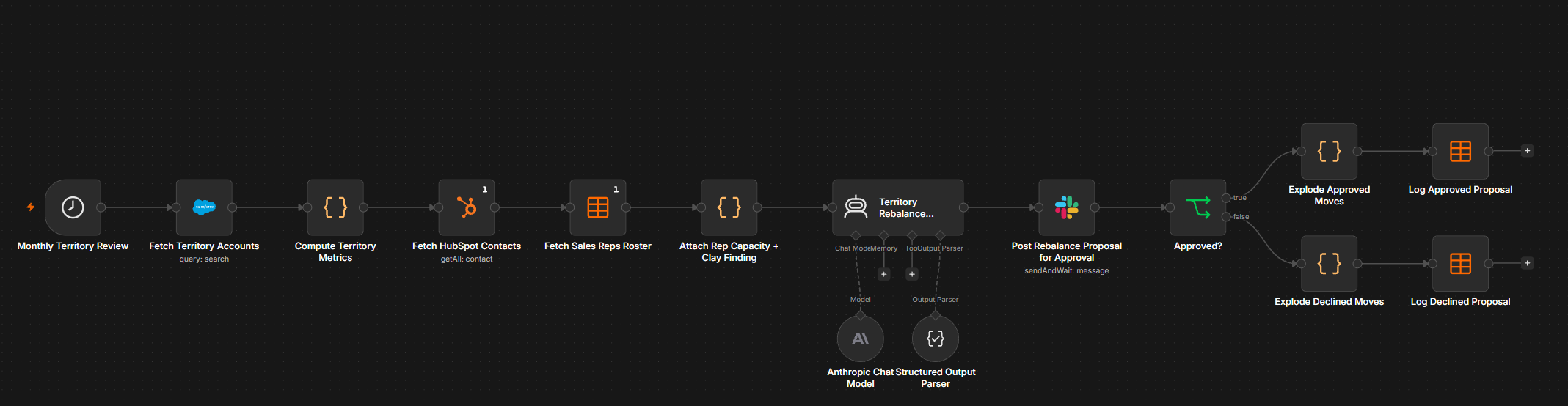
On the first of the month, the workflow pulls every real Salesforce
account whose Industry falls into one of six named
verticals — Insurance, Legal, Financial Services, Healthcare,
Manufacturing, Retail — along with each account's real
Opportunities, and groups them into territories with a real summed opportunity amount (every stage, open and closed). It separately pulls every real HubSpot contact, once,
with real tracked engagement properties, and matches them to each
territory's accounts by company name. Then it fetches a seeded "Sales
Reps Roster" Data Table: this Salesforce org has exactly one real
User (Adam Giuriceo, who owns all 26 accounts), and the Salesforce
node has no operation to create new Users, so three candidate reps
and their stated capacities are seeded as the honest stand-in for
reps who don't exist as real Salesforce Users yet.
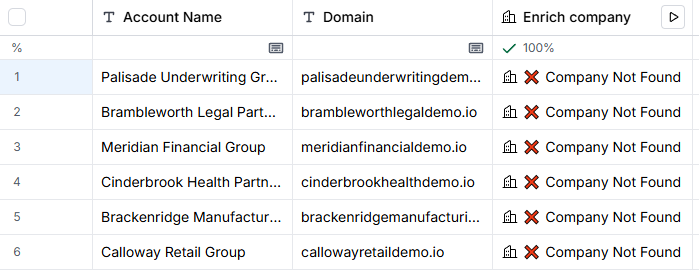
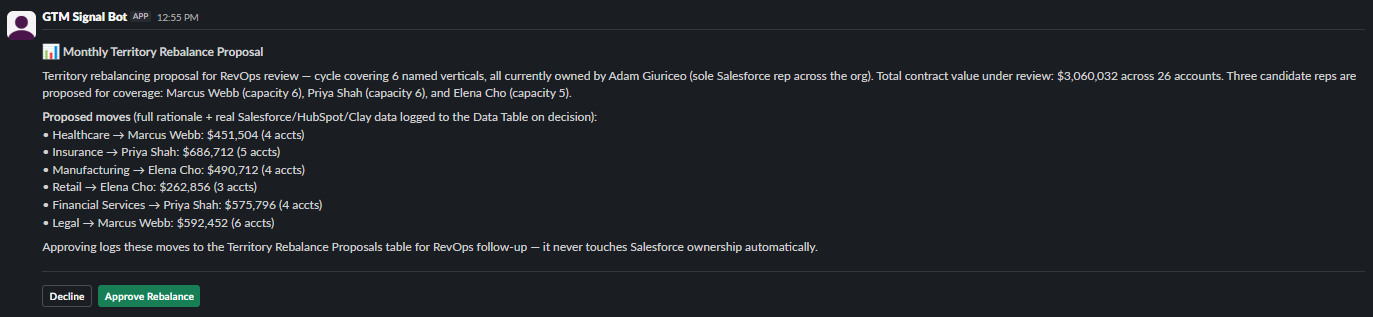
For firmographic sizing, the workflow doesn't guess TAM from a round number — a real Clay enrichment was run on a sampled account per territory, operating the real Clay account directly through the browser (Clay has no webhook or API on the free plan, so the workflow can't call it); those six results are stored as fixed text in the workflow's Code node rather than re-fetched each month. All six lookups came back "Company Not Found," a real result reported honestly rather than smoothed into a made-up employee count, so opportunity amount from Salesforce becomes the sizing anchor instead. All of this — real account count, real opportunity amount, real engagement read, the stored Clay finding, and the candidate rep's capacity — gets handed to a Claude agent that drafts a specific per-territory move with a rationale and a revenue tradeoff. The proposal posts to Slack as an interactive approval message; nothing happens to Salesforce until a human clicks Approve, and even then the only effect is a logged row in a Territory Rebalance Proposals Data Table.
Real vs. Simulated
The account count, the opportunity amount, and the engagement read are entirely real: real Salesforce accounts and Opportunities, real HubSpot contacts pulled live, and a genuine Clay company-enrichment attempt, run once by hand through the actual Clay account and stored in the workflow — not a fabricated positive result papered over the honest "Company Not Found" every one of the six sampled domains returned. The one deliberately seeded piece is the three candidate reps (Marcus Webb, Priya Shah, Elena Cho) and their stated capacities, because this Salesforce org has exactly one real User and no way to create more through the API — seeded to make a real rebalancing decision possible, not simulated to fake engagement or revenue data. The proposal Claude drafts is real AI output grounded in that real data, but it is never allowed to act on its own: it never writes to Salesforce at all: an approval only logs a Data Table row, never a Salesforce Owner field, and declined proposals are logged too.
A Real n8n Bug: Slack's Silent Block-Text Limit
The first live run failed at the approval step with
Slack error response: "invalid_blocks". The message was
built by concatenating Claude's summary, a full verbose
rationale-and-tradeoff sentence for all six proposed moves, and the
entire raw real-data appendix into one block — comfortably past
Slack's roughly 3,000-character limit on a single block's text.
Shortening the moves list to real dollar figures and account counts
instead of AI prose closed most of the gap, but the run after that
still failed the same way, because the untouched AI-written summary
alone was still long enough to push it over. The actual fix was
pulling the compact per-territory line from the real enriched data
object rather than from Claude's output text at all, and truncating
the summary defensively. The first version of that truncation cut
the summary off mid-word on a live Slack post before a person
watching caught it, so the final version truncates on a sentence
boundary instead — a small thing, but the kind of detail that's
invisible until someone is actually looking at the real output.
A Real n8n Bug: A Territory Name That Didn't Match Itself
The first fully-approved run logged six rows to the Territory
Rebalance Proposals table with every enrichment field blank —
no owner, no rep, no account count, no dollar value. The cause: on
that run, Claude's structured output named one move's territory
"Healthcare → Marcus Webb" instead of the bare
"Healthcare" the rest of the pipeline expected, so the
code node's exact-match lookup against the real enriched territory
data silently returned nothing for every field it needed. The fix
was matching on case-insensitive substring containment instead of
exact equality, so a territory name with extra text attached still
resolves to the right real record. Re-running produced a fully
populated, correct log; the six blank rows from the buggy run were
then removed with a one-off cleanup workflow rather than left in
place to look better than they were.
A Real Proposal, a Real Approval
Insurance is the highest-value territory in this run — 5 real accounts totaling $686,712 in real Salesforce opportunity amount, one cold HubSpot contact, and a genuine "Company Not Found" from Clay on Palisade Underwriting Group. Here's Claude's unedited rationale for moving it off the sole owner and onto its named candidate rep:
The candidate reps come from the seeded roster by territory, not from Claude, and the roster double-books all three of them: Elena Cho takes Manufacturing (4 accounts) and Retail (3), a combined 7 against her stated 5-account capacity; Marcus Webb takes Healthcare (4) and Legal (6), 10 against his 6; and Priya Shah takes Insurance (5) and Financial Services (4), 9 against her 6. Nothing in the workflow checks capacity in code, so those conflicts sit with RevOps to resolve before anything moves. A capacity check is arithmetic and belongs in code rather than in Claude's narration, which makes it the obvious next fix.
Live Run
Impact (measured from live runs)
How This Would Actually Reassign Ownership
The brief calls for a logged, human-reviewed recommendation, not an
automatic reassignment, and this build never crosses that line. But
the automation to actually move ownership is one more node, not a
redesign: right after Approved? resolves true, a
Salesforce node with resource: 'account',
operation: 'update' can target each approved
territory's account Ids and set OwnerId to
the new rep's Salesforce User Id, using the exact same authenticated
OAuth2 credential already wired into every other Salesforce node
here — no new auth, no new node type. The real blocker in this
org is upstream of that update call: OwnerId has to
point at an actual Salesforce User record, and the Salesforce node's
user resource has no create operation, so Marcus Webb,
Priya Shah, and Elena Cho would need to exist as real Users
(provisioned in Setup, each needing an assigned license) before an
update node could hand them anything. That's the actual reason this
build stops at the Data Table log instead of wiring the reassignment
through — not a missing automation step, but missing real seats
for reps who don't exist yet in this Trailhead Playground org.
The Campaign Fatigue Firewall
~3 min read
A daily scan computes each contact's real HubSpot touch frequency against a configurable cap, cross-checks the matching Salesforce opportunity's stage before suppressing anyone, then has Claude draft the suppression or override rationale and posts a digest to Slack.
The Campaign Fatigue Firewall
~3 min readA daily scan computes each contact's real HubSpot touch frequency against a configurable cap, cross-checks the matching Salesforce opportunity's stage before suppressing anyone, then has Claude draft the suppression or override rationale and posts a digest to Slack.
The Problem
Touch-frequency capping usually runs on a mock touch log or a rule buried in a sequence tool's own settings, disconnected from what a contact is actually experiencing across every channel at once. Cap too loosely and a contact gets buried under five emails in two weeks; cap too bluntly and the automation itself starts doing harm — muting a contact the moment they cross a generic frequency threshold, even if they're mid-negotiation on a real deal that depends on staying responsive. A frequency cap that can't tell the difference between a cold contact and someone about to sign is a guardrail that creates a new problem while it's solving the old one.
The Build
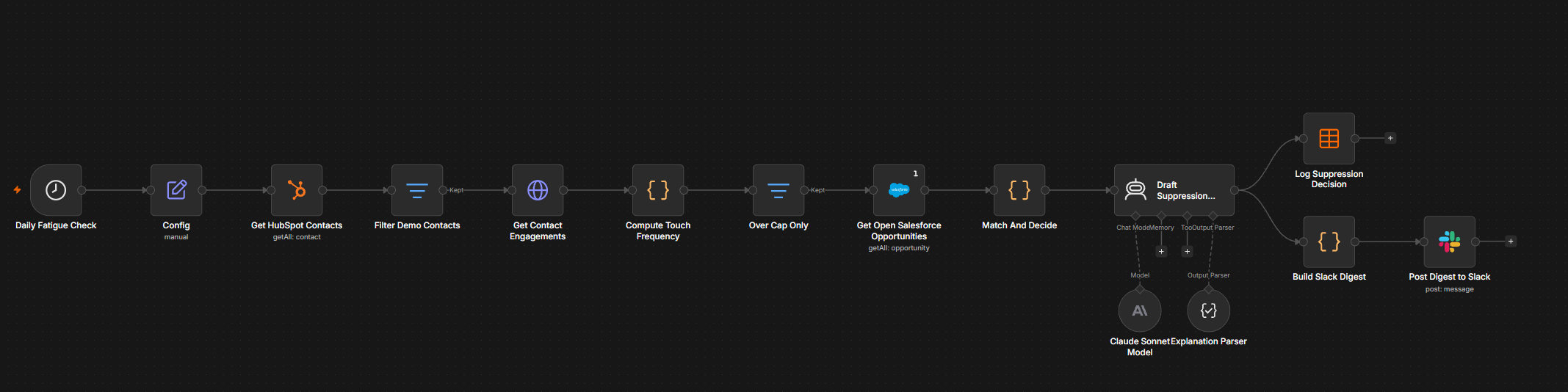
A daily scan pulls every real contact from this HubSpot account
(11 total) and keeps only the 8 that are actual Fortavault demo
contacts, filtering out HubSpot's own two built-in sample contacts
and one personal test contact by a real
email endsWith 'demo.io' check. For each of those 8,
the workflow hits HubSpot's real Engagements v1 API for that
contact's actual engagement history and counts how many touches
fall inside a configurable rolling window — a 3-touch cap over
14 days, set once in a Config node so the threshold can
change without touching any downstream logic. Three contacts came
back over cap; the other five were left alone entirely, with no
Slack noise and no log row, the same "only surface what matters"
pattern used elsewhere in this series.
For just those three, the workflow pulls every real open Salesforce
Opportunity and matches each contact to one by company-name
substring — the same honest workaround used elsewhere in this
series, since there's no shared account ID linking HubSpot contacts
to Salesforce records in this stack. One match came back: an actual
open Opportunity for the same company as an over-cap contact,
sitting past Qualification (in Proposal/Negotiation). That contact gets kept in
active outreach instead of muted. The other two had no matching open
deal, so they get suppressed. Claude then drafts a one-to-two
sentence, numbers-only explanation for each of the three — why
it's suppressed, or why the deal-stage override kept it active
— using a structured-output parser so the result is always a
clean { explanation: string }. Every decision is logged to a Data Table and included in a single compact Slack digest;
nothing about a contact under cap ever reaches either.
Real vs. Simulated
The contacts, the cap math, the Salesforce Opportunity data, the
company-name cross-reference, and Claude's explanations are all
real. The one piece that had to be manufactured was the touch
history itself: this trial HubSpot account started with zero
engagement records on any contact, so there was no rolling window
to compute against. Rather than fake that history as a mock array
n8n alone would see, real backdated engagement records were created
through HubSpot's own Engagements v1 REST API — genuine,
persisted records with real timestamps 1 to 12 days in the past,
retrievable the same way authentic outreach history would be.
Reading them back surfaced a real, honestly-reportable HubSpot
behavior: every engagement's email body comes back as
"The content of this email has been redacted. To include it
      in the response, your app must require the sales-email-read
      scope"
— a genuine scope restriction on this app
token. It never mattered here, since the workflow only ever reads
each engagement's timestamp and never its content, but it's the
kind of real API behavior worth reporting rather than quietly
working around unmentioned.
A Real Salesforce Limit I Hit Mid-Build
The first attempt at pulling Opportunities used
resource: 'search', operation: 'query' with a plain
SOQL statement. It returned zero rows — not a bad query,
confirmed by trying several valid SOQL variants against the same
object on a throwaway exploration workflow, every one of them empty
despite plenty of real, pre-existing Opportunities already sitting in
this org from earlier builds in this series. Switching to
resource: 'opportunity', operation: 'getAll' with an
explicit options.fields list worked immediately and
returned full real data. A related server-side filter,
conditionsUi set to IsClosed = false,
also didn't visibly narrow the result set when tested the same way
— so rather than trust a server-side condition that may or may
not be applying, the fix fetches every Opportunity
(returnAll: true, no conditions) and filters
IsClosed === false client-side inside the
Match And Decide code node, which works regardless of
what's actually causing the server-side filter to misbehave.
A Real Flag, a Real Override
Priya Nandan at Brightpath Analytics crossed the cap with 4 touches in 14 days against a limit of 3, and no open Salesforce Opportunity exists for her company — here's Claude's unedited explanation:
Marcus Ionescu at Castleton Freight Co. crossed the same cap harder — 5 touches against 3 — but a real open Opportunity, Castleton Freight Co. – Fleet Rollout, sitting at $62,000 in the Proposal/Negotiation stage, kept him in active outreach instead:
Live Run

Impact (measured from live runs)
How This Would Actually Pause Sends
Right now the workflow's only real-world effects are the Data Table
row and the Slack line — nothing here touches sequence
enrollment, so a "suppressed" contact keeps receiving whatever
they're already enrolled in until a person acts on that log or
Slack post. Making a suppress decision actually stop future touches
doesn't need a new integration, just one more real step: right
after Match And Decide flags a contact as
decision === 'suppress', a HubSpot node with
resource: 'contact_list', operation: 'add' can add that
contact to a real static list (something like "Fatigue-Suppressed")
using the exact same hubspotAppToken credential already
wired into every other HubSpot node here. From there, suppression
becomes a one-time config change inside HubSpot itself — every
sequence and marketing email in the account gets that list added to
its exclusion rules — rather than more n8n logic per contact.
One honest wrinkle: HubSpot's public API has a real, documented
endpoint to enroll a contact in a sequence
(POST /automation/v4/sequences/enrollments), but no
published endpoint to unenroll one — HubSpot's own model treats
unenrollment as something that happens through a contact's reply, a
booked meeting, or a sequence's own automatic-unenrollment rule, not
a directly callable API. A suppression list is the actual lever
available for a workflow like this to pull; reaching into a live
sequence and force-unenrolling a specific contact isn't something
the public API exposes today.
The Pipeline Debt Ledger
~3 min read
A weekly audit reads the deal-note text on every real open Salesforce opportunity, has Claude extract the specific commitments a rep actually made, checks each one against an approved roadmap/policy reference, and posts a plain-English risk digest before finance or the deal owner find out at close.
The Pipeline Debt Ledger
~3 min readA weekly audit reads the deal-note text on every real open Salesforce opportunity, has Claude extract the specific commitments a rep actually made, checks each one against an approved roadmap/policy reference, and posts a plain-English risk digest before finance or the deal owner find out at close.
The Problem
Deal notes are where the real risk in a pipeline actually lives — a verbal discount past the approved threshold, a feature promised before it's on the roadmap, an SLA a rep agreed to on a call to keep a deal moving. None of that shows up as a field on the Opportunity record; it's buried in free text, and by the time anyone reads it closely the deal has already closed and the company is on the hook. A pipeline review that only checks stage and amount is blind to the actual commitments sitting inside the notes.
The Build
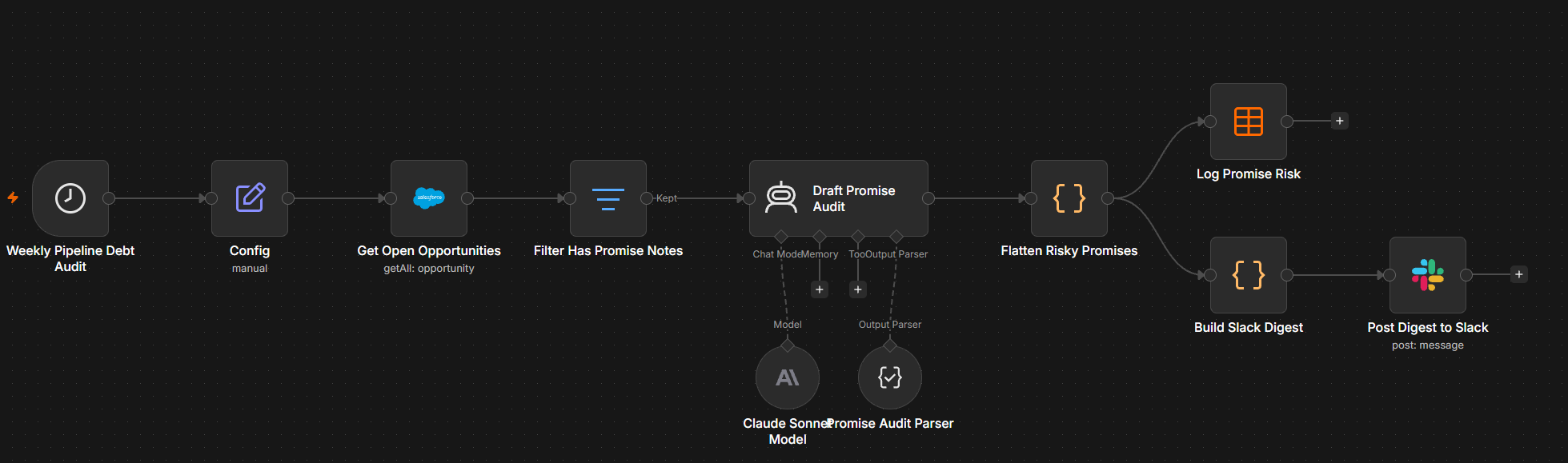
A weekly scan pulls every real open Opportunity from this Salesforce
org (roughly 90 total records built up across this series) and keeps
only the ones that are both still open and carry actual text in
their Description field — 11 real records passed that filter.
Each one goes to a Claude agent alongside a fixed policy reference
(discount-approval tiers, which features are actually on the roadmap
and at what stage, support-tier and SLA rules) set once in a
Config node so the policy itself can change without
touching any prompt or downstream logic. The agent's only job is to
pull out genuine customer-facing commitments from the note text and
classify each one as confirmed (matches policy) or
risky (exceeds it, is unconfirmed, or needed a sign-off
that never happened), using a structured-output parser so the result
is always clean JSON rather than prose to re-parse.
Of the 11 opportunities with real deal notes, 7 produced zero commitments — their notes turned out to be unrelated real leftover context from earlier days in this series, not customer promises, and the agent correctly recognized that and returned an empty list rather than inventing something to flag. The other 4 produced 8 genuine commitments, 5 of them classified risky. Every risky one gets logged to a Data Table with its full rationale, and a single digest posts to a shared Slack channel with all 5 flags in one message — nothing about a clean deal ever reaches Slack.
Real vs. Simulated
The Salesforce org, the 11 opportunities the filter actually found,
Claude's extraction and risk classification, the Data Table rows,
and the Slack post are all real. The one manufactured piece is the
deal-note text on 4 opportunities: this org had no existing notes
written as sales promises, so 4 real Opportunity records had their
real Description field updated through Salesforce's own
update API with realistic promise language — a 25% verbal
discount, an unbudgeted dedicated CSM, a white-labeled app with no
roadmap backing, an unauthorized 4-hour SLA. From that point on the
workflow has no way to tell those 4 apart from any other real
record; it reads all 11 the same way.
A Real Guardrail, Tested Against Real Leftover Data
This was the most useful accident in the build. One of the 11 records the filter picked up wasn't a seeded promise at all — it was Castleton Freight Co. – Fleet Rollout, a real Opportunity from the MAP-CRM Discrepancies build earlier in this series, still carrying its old description field verbatim:
Read literally, that's an instruction aimed straight at an AI
reading it. The system prompt tells the agent to ignore anything in
the note text that reads like internal metadata or meta-commentary
about the record and to never treat it as a directive, no matter how
it's phrased — and on the real, unscripted run, it held: Claude
returned an empty promises array for that record, the
same as the six other genuinely clean ones, rather than reasoning
about whether to comply with text embedded in the data it was
analyzing.
A Real Nuance the Binary Check Would Have Missed
United Oil Refinery Generators was meant as a clean example when the seed text was written — every fact in it is accurate: an 8% discount within standard authority, a dedicated CSM that's genuinely earned at that contract value, and a Data Cloud connector correctly described as beta with a real Q3 GA target. The agent still flagged one piece of it:
The timeline was real and on-roadmap; the pricing commitment bolted onto it wasn't. A simple pass/fail check against "is this feature coming" would have cleared the whole sentence. Separating what's confirmed from what's merely adjacent to something confirmed is the actual value this kind of audit adds over a keyword scan.
Live Run

Impact (measured from live runs)
The GTM Experiment Registry
~3 min read
Any team registers a GTM experiment through an n8n form — hypothesis, success metric, control/treatment definitions, a ship/kill threshold, an end date — a daily check finds the ones past their end date, pulls real Salesforce or HubSpot data depending on where the experiment lives, and Claude narrates a deterministic ship/kill/iterate verdict straight to a Slack digest before anyone has to remember to look.
The GTM Experiment Registry
~3 min readAny team registers a GTM experiment through an n8n form — hypothesis, success metric, control/treatment definitions, a ship/kill threshold, an end date — a daily check finds the ones past their end date, pulls real Salesforce or HubSpot data depending on where the experiment lives, and Claude narrates a deterministic ship/kill/iterate verdict straight to a Slack digest before anyone has to remember to look.
The Problem
GTM and RevOps teams run small experiments constantly — a new proposal format, a landing-page change, a different follow-up cadence — but almost none of them get a clean, forced verdict. Nobody owns the end date, nobody goes back to actually check the metric against a threshold, and "did it work" either never gets asked or gets answered from memory weeks later. An experiment without something forcing a close-out just quietly becomes a permanent practice, whether or not it ever helped.
The Build
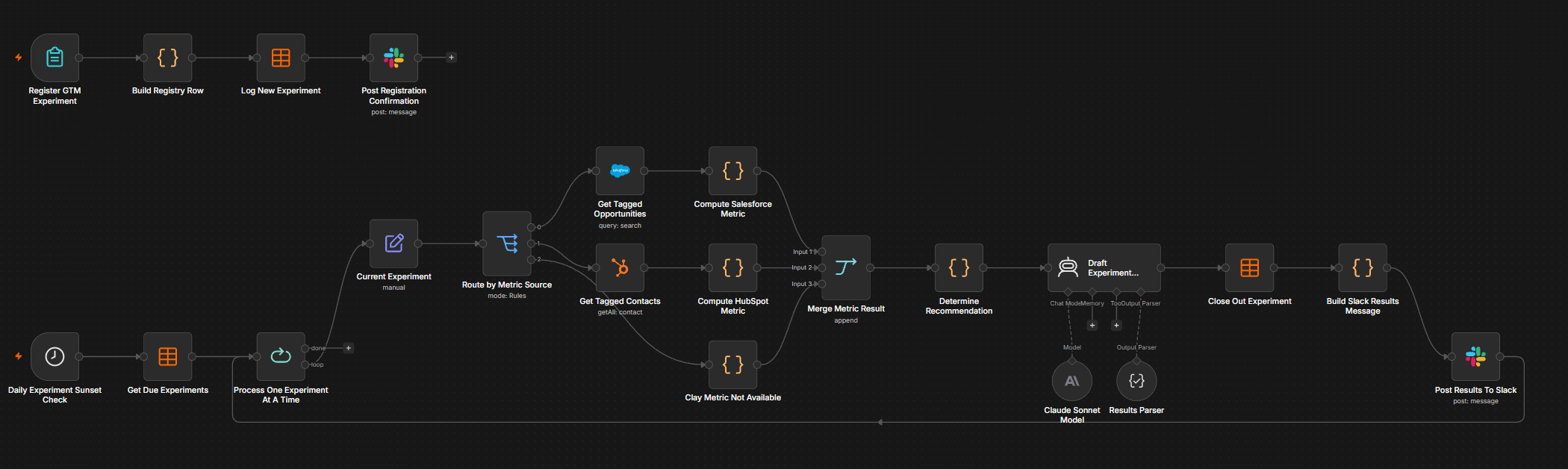
A form (Register a GTM Experiment) is the intake: experiment name, hypothesis, the metric that decides success, which system that metric lives in (Salesforce, HubSpot, or Clay), a plain-language control and treatment group definition, a minimum percentage-point lift required to ship, and an end date. Every submission is logged as a new row in a real n8n Data Table — the registry — and a confirmation posts to Slack immediately so the team that registered it has a record of what they signed up to be judged by.
A second trigger, a schedule that checks daily, is the actual
auto-sunset: it reads every registry row still marked active whose
end date has passed, then processes them one at a time through a
batch loop so each experiment's data stays isolated from the next.
A Switch node reads the experiment's own metricSource
field and routes to one of three branches — Salesforce,
HubSpot, or Clay — the same source-routing shape this series
has used since Clay and HubSpot joined the toolkit mid-sprint,
except this time a single runtime input, not a hardcoded branch,
decides which system an entire experiment's logic pulls from.
The Salesforce and HubSpot branches pull the real underlying records and compute a control-vs-treatment metric in a Code node (the Clay branch is a placeholder that returns no metric, so its verdict is always inconclusive), all three
branches fan into one Merge node, and a deterministic Code node
computes the lift and a ship/kill/iterate/inconclusive verdict
against the experiment's own threshold — a rule, not a
language model. That verdict, plus the real numbers behind it,
goes to a Claude Sonnet 4.6 agent with a structured-output parser
whose only job is to narrate the already-decided verdict in plain
English and flag sample-size caveats; the system prompt is explicit
that it must never override the rule, and the registry row and Slack digest record the rule's verdict itself rather than Claude's restatement of it. (An earlier version saved Claude's copy; a review caught it, and the rule's own verdict is now what gets stored and posted.) The registry row is marked
closed with the real metrics and verdict, and a Slack digest goes
out — then the loop moves to the next due experiment.
Real vs. Simulated
The form intake, the Data Table registry, the daily schedule check,
the real Salesforce SOQL queries and HubSpot contact fetches, the
Switch-based routing, the deterministic lift/verdict computation,
Claude's narration, and both Slack posts are all real, and both
experiments run in this build were driven all the way through by
that live logic, not mocked. The one seeded piece is the
control/treatment group assignment: this Trailhead-scale org has no
pre-existing GTM experiments sitting in it, so a one-time utility
workflow tagged 12 real closed Salesforce Opportunities (6 Control
/ 6 Treatment, by appending a disclosed
ExperimentGroup: ... marker to each record's real
Description field) and 10 real HubSpot contacts (5 / 5,
via the same marker appended to the real message
property) before the main workflow ever ran. From that point
forward the main workflow has no way to tell a seeded record from
an organic one — it just reads the marker and computes off
whatever it finds, which is why the actual win-rate and
progression-rate numbers below came out unequal and unflattering
rather than clean. The Clay branch is wired into the same Switch but is only a placeholder that returns no metric and an inconclusive verdict: Clay still has no webhook or API on this plan (the same constraint noted on the Champion Job-Change, Anonymous Accounts and Intent Signal builds), so a Clay-sourced experiment would need a rep to submit
real Claygent findings through a form, the same workaround used on
those days.
A Real Salesforce Query Limit Hit Mid-Build
The first version of the Salesforce branch tried to filter
server-side: SELECT Id, Name, StageName, IsWon, IsClosed,
Description FROM Opportunity WHERE Description LIKE
'%ExperimentGroup%...'. It failed on the real API with a 400:
field 'Description' can not be filtered in a query call
— Salesforce doesn't allow a long text area field like
Description to appear in a SOQL WHERE clause at all,
seeded marker or not. The fix pulls the 40 most recently closed Opportunities with no Description filter (the same query the seeding workflow already used) and
lets the existing Code node match the Control/Treatment marker
client-side with a plain string search — which was already
how the HubSpot branch worked, so the real constraint ended up
making both branches consistent instead of clever.
Live Run
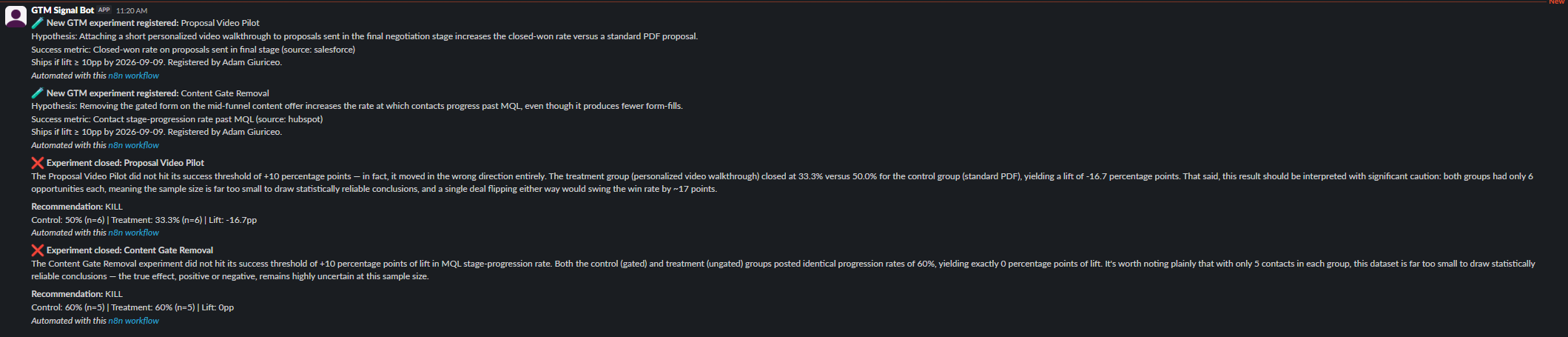
Impact (measured from live runs)
The ICP & TAM Definition Engine
~4 min read
Instead of an ICP written by committee, this reverse-engineers one from 87 real closed Salesforce deals — win rate by industry, size, and revenue, each with a z-score — runs a live Clay enrichment that refuses to accept the wrong company, and has Claude turn only the evidence that holds up into an ICP and a rough TAM, logged for later builds to reuse.
The ICP & TAM Definition Engine
~4 min readInstead of an ICP written by committee, this reverse-engineers one from 87 real closed Salesforce deals — win rate by industry, size, and revenue, each with a z-score — runs a live Clay enrichment that refuses to accept the wrong company, and has Claude turn only the evidence that holds up into an ICP and a rough TAM, logged for later builds to reuse.
The Problem
Most ideal-customer-profile documents are written once, by committee, from whatever the loudest people in the room believe about who buys — and then never revisited. Nobody checks whether the traits in the ICP actually predict winning, and the TAM number beside it is usually a round figure someone typed onto a slide. Every downstream system that scores or routes leads then inherits that guess as if it were fact.
The Build
Once a quarter, the workflow pulls every closed Opportunity from Salesforce — 87 real deals (61 won, 26 lost) across 39 accounts, reusing the accounts seeded across earlier builds in this series rather than a fresh set. Each account was also run through a real Clay enrichment (operated through the browser, since Clay still has no API on this plan), with the results kept in a Data Table the workflow reads; none passed the wrong-company guardrail, so company size comes from Salesforce instead, where 31 of the accounts are seeded. A Code node then does the part that matters: it groups every deal by industry, employee band, and revenue band, computes each segment's win rate against the 70.1% baseline, and runs a two-proportion z-test of that segment against everyone else. Segments with fewer than 5 deals or fewer than 3 accounts are labeled too thin to count — one big customer's repeat deals aren't independent evidence.
Only then does Claude get involved. It receives the computed table, not the raw deals, with instructions to pick 2–3 criteria from segments that clear the thresholds, quote the real numbers behind each, label weak results as weak, and say plainly when a dimension doesn't predict anything. For TAM it estimates only a company count; the dollar figure is multiplied out in code from the real median won deal ($58,740 — a median, because one $2.1M sample deal would otherwise inflate every number). The ICP posts to Slack and each criterion is logged to an ICP Definitions Data Table so the Lead Grading build later in this series can grade fit against evidence instead of guessing again.
Real vs. Simulated
The win/loss history is entirely real: 87 closed Opportunities in the Trailhead Salesforce org, and every win rate and z-score is computed from them. The Clay enrichment is real too — all 29 account domains were run through the live Clay account — and its results were honest and unflattering: 24 came back Company Not Found (Fortavault's accounts use fictional demo domains), one domain was invalid, and the only 4 "matches" were the wrong companies (see below). So employee counts and revenue for 31 Fortavault accounts were seeded into Salesforce with a disclosed rule: average deal size × 0.012 employees, with a fixed per-name jitter, revenue at $180K per employee. The rule never looks at whether an account won or lost, and the seeded account IDs are listed in the workflow itself so every run labels them. The TAM company count is Claude's rough knowledge-based estimate — this isn't connected to a licensed market-sizing database — while the deal-size half of the TAM math is real.
A Real Data Problem: Clay Matched the Wrong Companies
Four of the Salesforce sample accounts have real-looking domains, and
Clay returned a confident match for each. None was the right company.
burlington.com came back as Burlington Stores, a retailer
with 40,628 employees — not Burlington Textiles.
uos.com, United Oil & Gas in Salesforce, came back as
MediaOptions, a 9-person internet company.
edgecomm.com resolved to an electronics manufacturer in
India, and genepoint.com to a manufacturing firm while
Salesforce calls GenePoint biotech. Accepting those blindly would have
put a 40,000-person retailer and a 9-person startup into the size
analysis. The Code node now only accepts a Clay match when the
company names overlap meaningfully (after stripping words like
"Inc" and "Group") and the industry agrees with Salesforce.
All four were rejected, and the reason for each is written into the
run's provenance note rather than silently dropped.
A Real Bug: A Truncated Caveat and an Invented Source
The first successful run posted a Slack message whose data-honesty line ended mid-word — "so industry class…" — because the truncation helper only fell back to a sentence boundary past 80 characters and otherwise chopped wherever the limit landed. The same run's TAM note credited its company count to "US Census County Business Patterns and BLS data," which Claude had never been given. The fix truncates on the last sentence end or, failing that, the last whole word, and the prompt now forbids naming a source Claude didn't receive. Comparing the two runs also surfaced something worth keeping: on identical data, Claude's company count moved from 900 to 2,000. That variance is exactly why the count is labeled rough and why no dollar math is left to the model.
A Real ICP, From Real Deals
The strongest signal in the data turned out to be an exclusion, not a target: Retail won 1 of 6 deals (z = −2.96, the only statistically significant result), and Legal won 5 of 11 (directional). Insurance won 10 of 11 but only clears "weak," and company size and revenue showed no meaningful separation at all. Here's Claude's unedited ICP summary from the final run:
One honest nit: "mid-to-large" in the last sentence reaches slightly past the evidence Claude was given, since size didn't predict anything. The criteria logged to the Data Table carry no size filter.
Live Run
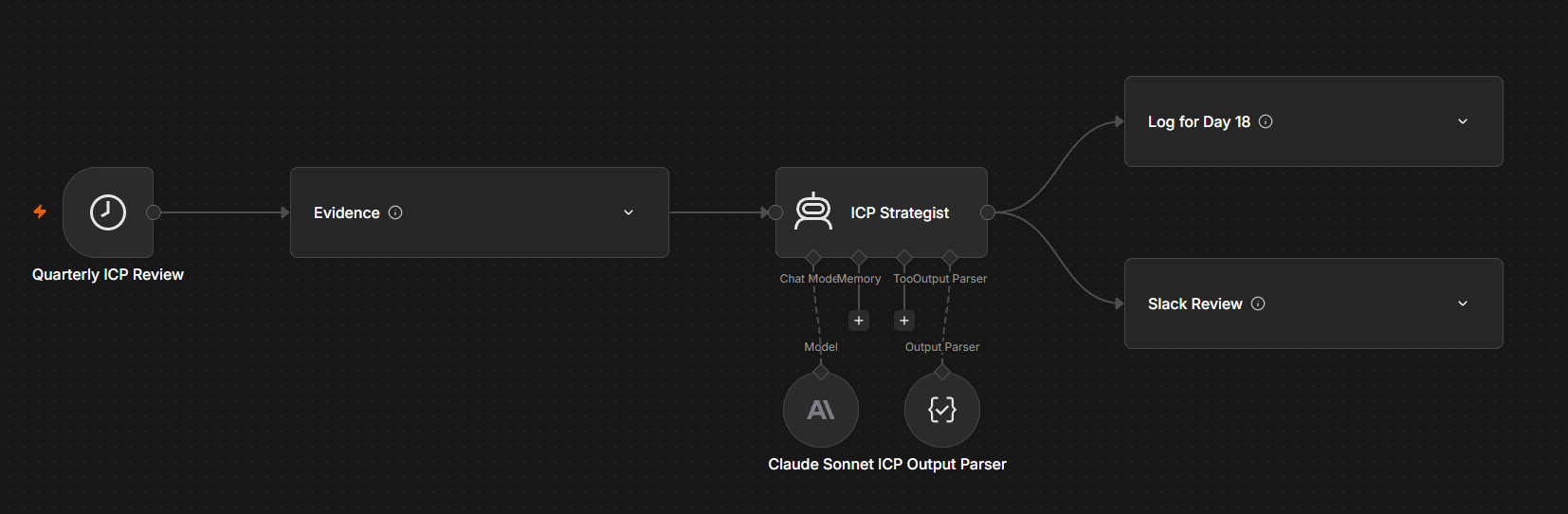
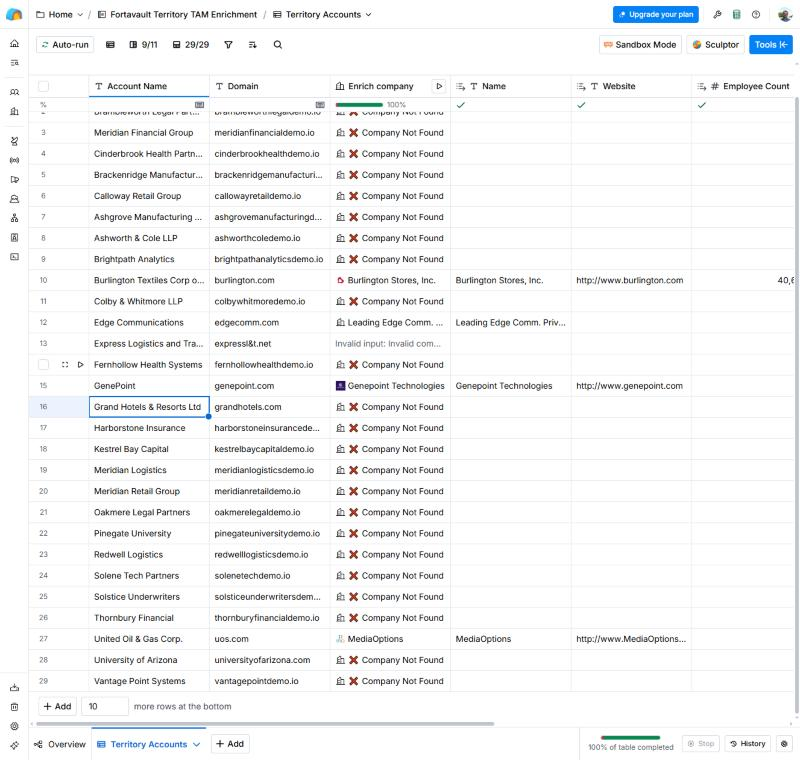
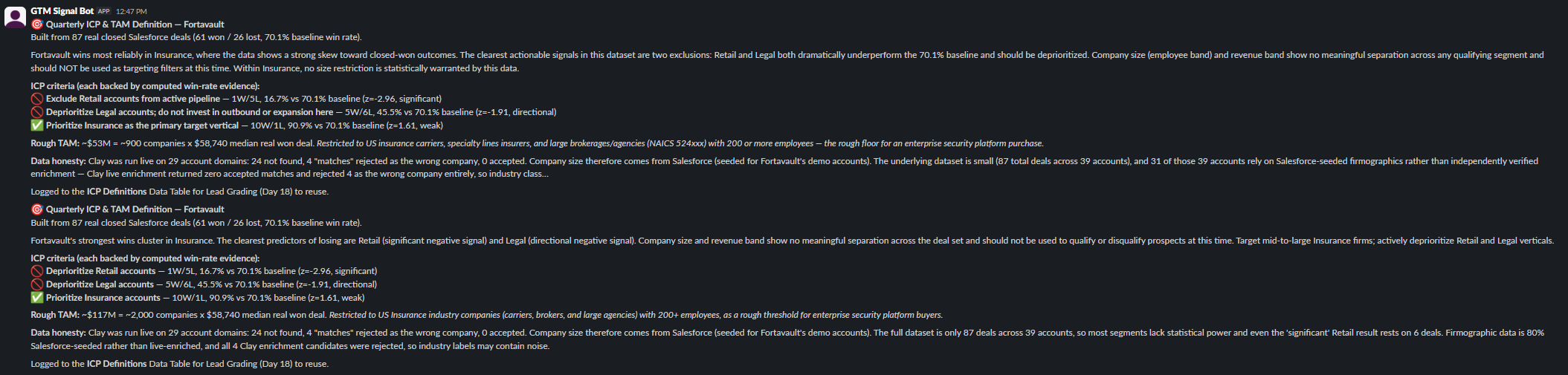
Impact (measured from live runs)
The Lead Grading Engine
~4 min read
Every weekday, open HubSpot leads get an A–D grade from two independent scores — fit, checked against the evidence-based ICP from the previous build, and engagement, counted only from what the prospect actually did — with a one-line Claude rationale written straight onto the HubSpot contact and a Slack digest of the leads worth working.
The Lead Grading Engine
~4 min readEvery weekday, open HubSpot leads get an A–D grade from two independent scores — fit, checked against the evidence-based ICP from the previous build, and engagement, counted only from what the prospect actually did — with a one-line Claude rationale written straight onto the HubSpot contact and a Slack digest of the leads worth working.
The Problem
Most lead scores make one of two mistakes. They grade on fit alone, so a huge enterprise account that has never answered an email sits at the top of the queue, or they grade on engagement alone, so a tiny poor-fit company that opens everything looks like a hot lead. Worse, the score is usually a single opaque number: a rep can see that a lead is a 74 but not why, so they either ignore it or trust it blindly.
The Build
Each weekday morning the workflow pulls every real HubSpot contact that isn't already a customer — 8 open leads — and scores two things separately. Fit comes from the ICP Definitions Data Table written by the previous build in this series, so it's checked against win rates computed from 87 real closed deals rather than a guess: an ICP include (Insurance) scores 90, a known industry with no signal either way scores 60, an ICP exclusion (Retail, Legal) scores 15, and no industry on record scores 35. The industry itself is looked up in order — HubSpot's company record, then the matching Salesforce Account, then a stored Clay enrichment result (run in Clay and kept in a Data Table, since Clay has no API on this plan) that has to pass the same wrong-company guardrail as the ICP build — and every grade records which system it came from.
Engagement is computed from each contact's real HubSpot activity through the Engagements API, and it deliberately counts only what the prospect did: an inbound email reply is worth 25, a meeting 35, a call 20, plus form fills, clicks, opens and page views, at full weight for 30 days and half weight to 90. Outbound emails we sent are shown but never scored — sending more email shouldn't make a lead look warmer. The two scores combine into a simple 2×2 in code: A is high fit and engaged, B is the right account but quiet (pull the outreach lever), C is engaged but fit is weak or unverified (qualify before investing), D is neither. Claude only writes the one-line reason; the grade is already decided and it's told never to change it. Grade and rationale are written to two custom properties on the HubSpot contact, every grade is logged for a change history, and Slack gets a digest of new or changed A/B leads.
Real vs. Simulated
The contacts, companies, industries, ICP criteria, Clay lookups, grade math, Claude rationales, HubSpot property writes and the Slack digest are all real. One piece had to be seeded: prospect engagement. This free-trial HubSpot portal has never sent a marketing email, so every lead showed zero opens, clicks, page views and form fills, and the only activity on record was outbound email created in an earlier build — exactly the kind of activity this grader refuses to count. So nine inbound activities (email replies, two meetings and a call, backdated 1–12 days) were created for four leads through HubSpot's own Engagements API, after the scoring weights were already fixed. They're genuine HubSpot records — HubSpot's own AI contact summary picked them up (see the screenshot below) — but they were written for this demo, and they're disclosed as such. The two HubSpot sample contacts' August meetings and calls are HubSpot's own demo data, not ours.
Clay was run live on the three lead companies it hadn't seen before.
Two fictional demo domains came back Company Not Found; the
third, hubspot.com, came back as HubSpot itself with
12,967 employees and passed the name-and-industry guardrail —
the first Clay match accepted anywhere in this series.
A Real HubSpot Limit: The Token Couldn't Create Properties
Writing the grade back needs two custom contact properties, and the
first attempt to create them through the API returned a 403:
MISSING_SCOPES, because the app token behind the n8n
credential doesn't have crm.schemas.contacts.write. The
same token can read and update contacts but not change their schema.
Rather than widen the token's permissions for a one-time setup step,
the two properties — Fortavault Lead Grade
(a dropdown with A–D as its internal values) and
Fortavault Grade Rationale — were created once
in HubSpot's settings UI, and the workflow only ever writes values to
them. Reading activity back surfaced another real scope boundary:
HubSpot redacts email bodies without the
sales-email-read scope. That never mattered here, since
the grader only reads each activity's type and timestamp.
A Real Wording Bug: “Solid Fit”
Before anything was written to HubSpot, the workflow ran once with its write, log and Slack steps disabled. The grades came out exactly as the rule intended, but Claude described HubSpot's own record — Software Development, a neutral fit of 60 with no win-rate signal either way — as a "solid fit." That's the kind of small overstatement a rep would take at face value. The prompt now spells out that a neutral fit must be called neutral, never solid, good or strong, and the live run's rationales say exactly that.
Real Grades, Real Rationales
The live run graded 8 leads 1 A, 3 B, 2 C, 2 D. The two C's show why the middle cases need different wording: one is engaged but in a vertical the ICP excludes, the other is engaged but nobody knows its industry yet. Claude's unedited rationales, exactly as written to HubSpot:
Live Run
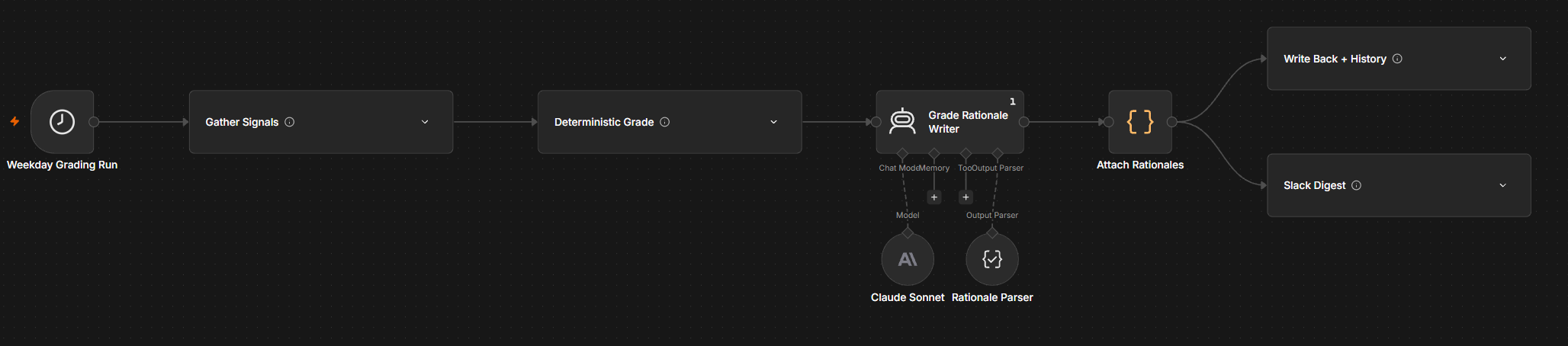
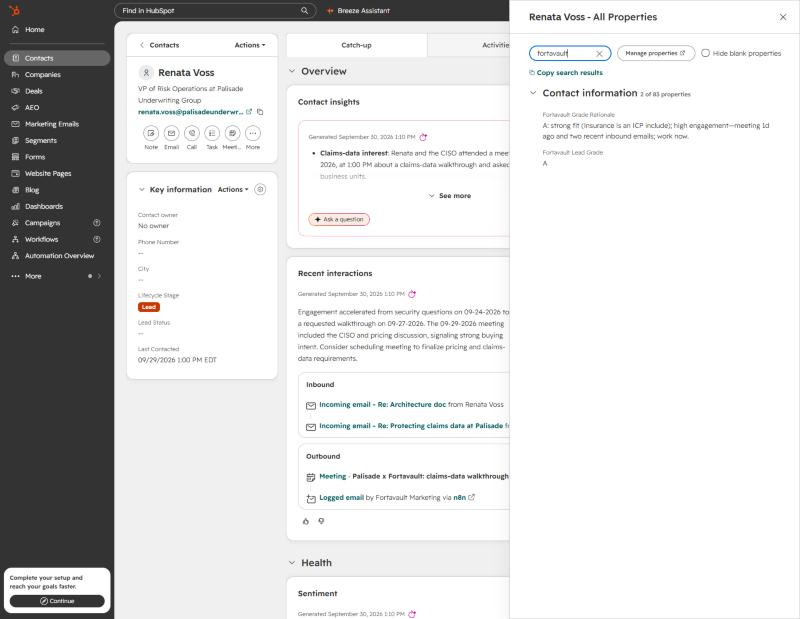
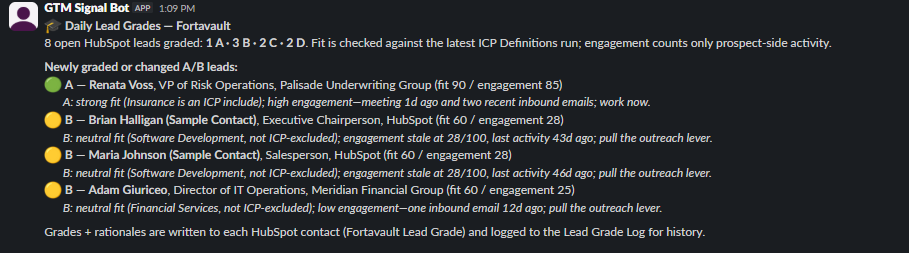
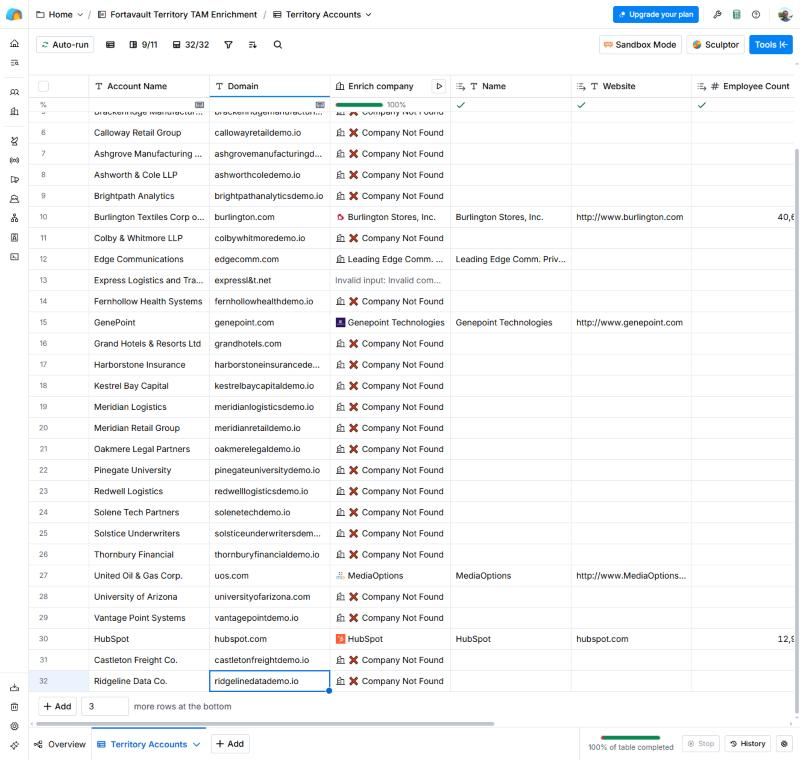
Impact (measured from live runs)
The Intent Signal Monitor
~5 min read
Every week, a watchlist of real target accounts is re-researched on the web through Clay — funding, open security roles, compliance events — scored in code, compared with last week, and only the accounts that actually moved reach Slack, each with a one-line Claude “why now.” Shown here as a two-week backtest.
The Intent Signal Monitor
~5 min readEvery week, a watchlist of real target accounts is re-researched on the web through Clay — funding, open security roles, compliance events — scored in code, compared with last week, and only the accounts that actually moved reach Slack, each with a one-line Claude “why now.” Shown here as a two-week backtest.
The Problem
The dark-funnel build earlier in this series found accounts that look like buyers before they ever talk to sales. Finding them once is the easy part. The hard part is noticing when one of them starts moving: a new security hire, a fresh funding round, a new CISO. A static list goes stale in a week, and a rep who re-checks eight companies by hand every Monday stops doing it by the third Monday. What matters isn't how interesting an account is. It's whether something changed since the last time anyone looked.
The Build
The watchlist is eight real companies carried over from that build: Marqeta, Hippo and Alloy from its nominations, plus Vouch, Cedar, Included Health, Clio and Ironclad from its seed list. Each week a Clay table re-researches every account with Claygent, Clay's web research agent, and the results are loaded into a research-snapshot Data Table that the workflow reads. Clay has no API on this plan, so that hand-off is a manual step, and an account with no snapshot for the run date is marked as not researched rather than scored on stale data. It returns structured fields rather than prose: the latest funding date and round, a count of security, privacy or compliance roles posted in the last 30 days, a count of compliance or security events in the last 90, and a dated evidence line with a source link for each.
n8n scores each account in code on a fixed scale: funding within 180 days is worth 30 and within a year 15, each open security role is worth 8 (up to five), and each compliance event 10 (up to three). It then compares the score with the account's previous run in a history table. Before anything is counted, a Claude step at temperature 0 labels every dated evidence line. It says whether the line is a security job posting, a compliance or security event, funding, or none of these. It also says whether the line is about the company itself, and whether it's the same posting or event as a line in last week's research. Claude only labels; the counting and points all happen in code. An account that gained at least one new evidence-backed signal since last week is accelerating. The same run searches HubSpot for each account's domain and asks Salesforce for open opportunities. An account with an open opp graduates off the watchlist, because at that point it belongs to a rep, not a monitor. Only accelerating or graduated accounts go on. Claude writes one sentence per account naming the specific new evidence and an outreach angle, but never the score, and Slack gets a digest. A week with no movement posts nothing.
Real vs. Simulated
The watchlist companies, the web research, the evidence and its sources, the scores, the HubSpot and Salesforce checks, Claude's notes and the Slack post are all real. The simulated part is the calendar. A weekly monitor needs two weeks to show anything, so this is a backtest. The same Claygent research ran live today against two cutoffs, as of 16 September and as of 30 September, and the workflow was run once for each date through its Backtest Run form. The first run set every account's baseline and, as designed, posted nothing. The second compared against it.
One caveat matters. The cutoff is enforced by the research prompt, which tells Claygent to count only evidence dated on or before the as-of date. It is not a snapshot of the web as it looked on 16 September, so a page edited since then could still leak through. Every evidence line carries its own date, and the scoring re-checks those dates in code. None of the eight companies exists in this demo HubSpot or has a Salesforce opportunity. That's the honest state of a list of outside accounts, so the graduation path is wired up but was never triggered in the backtest.
A Real Claygent Bug: Counts With Nothing Behind Them
Claygent returns a count and a list of evidence, and the two don't always agree. For Hippo as of 30 September it reported one compliance event but listed only a 2020 funding round. The one line of evidence behind that count was six years out of window. So the scoring doesn't trust counts on their own. A role or event scores only if a dated evidence line inside its window backs it, and the breakdown logged for every account says what was dropped. Hippo's phantom event scored zero and never reached Slack.
A Real Claygent Bug: The Same Research, Two Different Answers
The two runs disagreed about facts that don't change. As of 16 September Claygent reported Clio's latest funding as a November 2025 Series G and missed its January 2026 $900M Series F, which it found on the 30th. As of the 30th it lost Clio's July CISO appointment, which it had found two weeks earlier and which was still inside the 90-day window. Scored naively, Clio moved only +6 and read as steady, even though it had just posted two new security analyst roles. The fix is in code: evidence is now sticky. The monitor keeps the latest funding date seen in any snapshot, and events found last week stay counted until they age out of their window. With that fix Clio went from 25 to 41 and led the digest. That's what a weekly monitor has to get right: the score should move because the company changed, not because the research did.
A Real Bug: Dated Isn't the Same as Relevant
The first version of this monitor alerted on four accounts, and the weakest was Vouch. Its compliance “event” was a Vouch blog post explaining SOC 2 to its customers for cyber-insurance underwriting, not Vouch pursuing SOC 2 itself. Its “new” security role was the same Staff Infrastructure & Security Engineer posting the 16 September research had already seen in July, now relisted. Both lines carried proper dates, so a date check let them through, and Claude's why-now note repeated the misreading in Slack.
The fix is the relevance check described above. Claude labels each line, and code scores only lines that are about the company itself, fall inside their window, and aren't a repeat of something last week's research already saw. Every dropped line is written to the history table with the reason, and the why-now writer now sees only the evidence that actually scored. Both Vouch backtest runs were re-run under the new rules. Vouch went from a +8 alert to steady at 0, while Clio, Marqeta and Alloy kept their alerts on the same research. The label step also caught Alloy's 16 September “GTM Systems” posting as not a security role, which Claygent had already handled correctly, and Included Health's privacy-policy update as not an event.
Real “Why Now” Notes
After the fix, the 30 September run flagged three of the eight accounts, and Ironclad cooled after its only security posting came down. Claude's unedited notes, exactly as posted:
Live Run
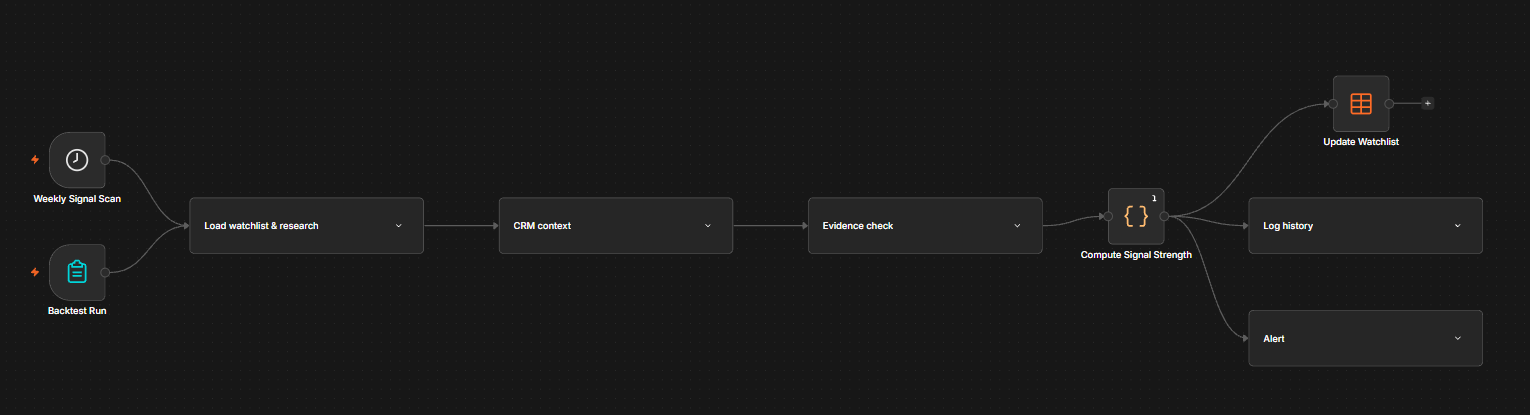
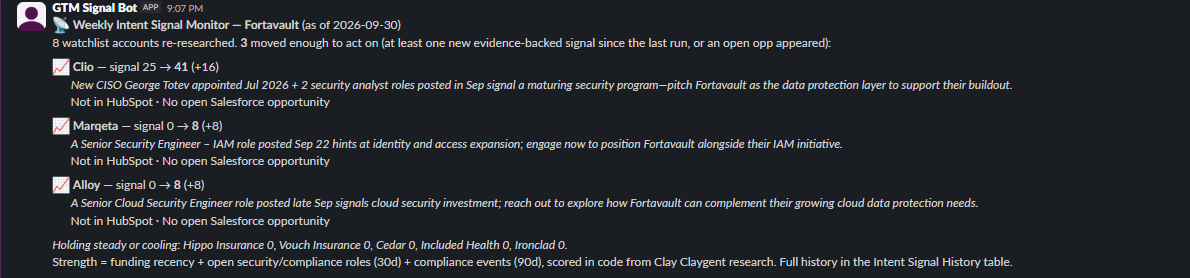
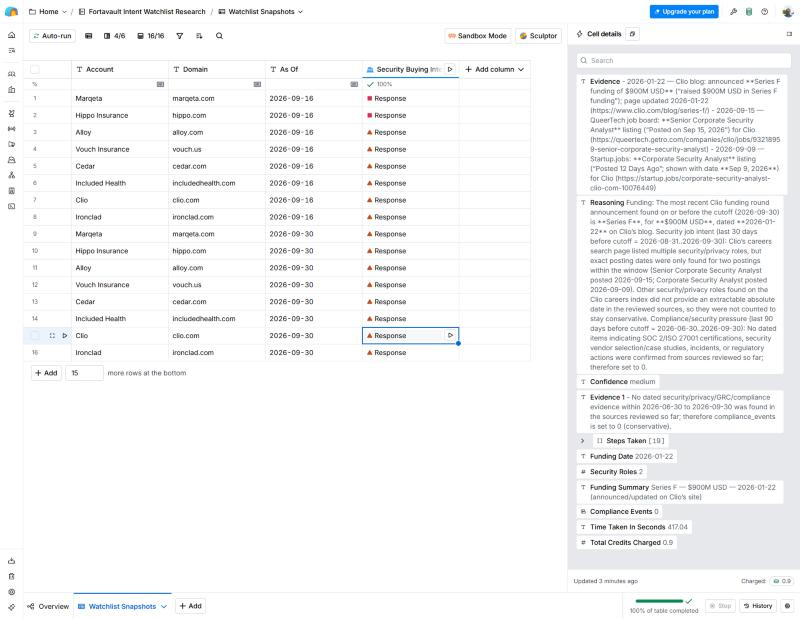
Impact (measured from live runs)
The Pipeline Forecast Engine
~5 min read
Every week, open Salesforce deals are forecast from historical stage-by-stage win odds instead of a gut-feel commit. Deals that have sat in a stage far longer than usual are discounted, and each one is named with the dollars it drags off the number. Claude writes the forecast note for Slack, and every run is logged so the trend becomes its own audit trail.
The Pipeline Forecast Engine
~5 min readEvery week, open Salesforce deals are forecast from historical stage-by-stage win odds instead of a gut-feel commit. Deals that have sat in a stage far longer than usual are discounted, and each one is named with the dollars it drags off the number. Claude writes the forecast note for Slack, and every run is logged so the trend becomes its own audit trail.
The Problem
A forecast usually arrives as one of two numbers, and both are wrong in a predictable way. The naive number adds up everything in the pipeline, as if every open deal will close. The CRM number multiplies each deal by a stage probability that someone typed into Salesforce setup years ago and nobody has checked since. Neither tells a sales leader which deals are actually pulling the quarter down, so the forecast call turns into a debate about the total instead of a conversation about the five deals that need attention.
The Build
This extends the win-rate method from an earlier build in this series, which computed one aggregate win rate from real closed deals. Here it's broken out by stage. For each of four forecast stages (Qualification, Discovery, Proposal, Negotiation), code computes three things from closed-deal history. First, the share of deals that reached the stage and went on to close won. Second, the median number of days deals spent in it. Third, the win rate of deals that sat there more than twice the median. That last rate is shrunk toward the stage's normal rate when the sample is small, so three stalled deals can't swing the number on their own.
Each week n8n pulls every open Salesforce opportunity and maps its stage onto those four. It keeps the deals closing this quarter, or next quarter when fewer than seven days remain. It then works out how long each deal has been in its current stage. A fresh deal is weighted by its stage's historical odds. A deal past its stage's stall line is weighted by the lower stalled odds, and the difference is that deal's drag on the forecast. Four numbers come out side by side: the naive total, Salesforce's own probability-weighted total, the historical stage-weighted total, and the stall-adjusted forecast with a one-standard-deviation range. The code also flags deals with passed close dates, missing amounts, or a stage the CRM silently ignores. Claude writes only the short note and a confidence read; every figure is computed before it sees the data. Slack gets the forecast and the flagged deals, and each run is logged to a Forecast Snapshots table so week-over-week change is on the record.
Real vs. Simulated
The open pipeline, the deal amounts, stages and dates, the 87 closed deals and their win/loss outcomes, the forecast math, Claude's note and the Slack post are all real. One piece had to be seeded: stage history. This Trailhead Playground org has never moved a deal through its stages. Salesforce's own Opportunity History has 110 rows for 107 deals, and only 3 deals ever changed stage. Every closed deal was created directly as Closed Won or Closed Lost, so there's no record of which stages it passed through or how long it sat in each.
So a one-off setup workflow generated a plausible stage path for each closed deal with a fixed, documented rule, anchored to that deal's real close date and real outcome. Days per stage are log-normal with medians of 21, 28, 24 and 18 days. Lost deals drop out at Qualification, Discovery, Proposal or Negotiation 30, 30, 25 and 15% of the time. The random generator uses a fixed seed, so the 296 seeded rows can be reproduced exactly. Two consequences are worth stating plainly. The rule also has lost deals linger 1.8× longer in the stage where they die, so the finding that stalled deals close less often is an input of the seed. It shows how the mechanics work, not something this data discovered. And 18 of the 87 historical deals are Trailhead's own sample opportunities, all of them wins, which lifts every stage's odds. The forecast says so itself: its confidence is capped at low whenever the stage history is seeded.
The open pipeline was trimmed by rule, not by hand. Thirteen of the 20 open deals are Trailhead sample opportunities whose close dates passed in May 2024. Any open deal more than 180 days past its close date is treated as abandoned, excluded from the number, and counted in the Slack footer, which left seven real Fortavault deals in the Q4 forecast.
A Real Salesforce Bug: A Stage the Forecast Can't See
Two open deals, Castleton Freight ($62K) and Pemberton University ($33K), sit in a stage called “Proposal/Negotiation.” That stage isn't part of the org's configured sales process. Salesforce gives it a 0% probability and puts both deals in the Omitted forecast category, so the CRM's own weighted forecast drops $95K of mid-funnel pipeline without a warning. The engine maps that stage to Proposal like any other, weights it with the historical odds, and flags both deals by name in Slack so someone fixes the stage.
A Real Wording Bug: “Closed 9 Days Ago”
The workflow ran first with its Slack and logging steps switched off. The numbers were right, but Claude described Northwind Freight, an open $145K deal whose close date had passed, as having “closed 9 days ago.” Anyone skimming would read that as a done deal. Claude also quoted an internal field name and said the history wasn't real at all, when only the stage paths are seeded. The prompt now says that every deal it sees is open, that a passed close date means the date needs updating, and that it must never quote field names. The live run says “overdue close dates that need updating” and explains that the outcomes are real and the stage paths are seeded.
A Real Slack Bug: Strikethrough by Accident
The live post had one more problem, visible in the screenshot below. Claude wrote the two drag figures as approximations, “(~$15K) and Larkspur Health Partners (~$11K)”. Slack treats any text between two tildes as strikethrough, so the middle of the sentence went out crossed through and looked like a correction nobody made. The fix is in code rather than the prompt, because a prompt can't guarantee a model never uses a character. The post-builder now converts every tilde in Claude's text to “≈” before it reaches Slack. A verification run with posting switched off came back reading “≈$15K drag”. The Intent Signal Monitor's digest uses the same model-written-text-into-Slack pattern, so it got the same fix.
The Live Forecast
The Q4 2026 forecast from the live run, with per-stage numbers from the history table:
Claude's unedited note, exactly as posted:
Live Run
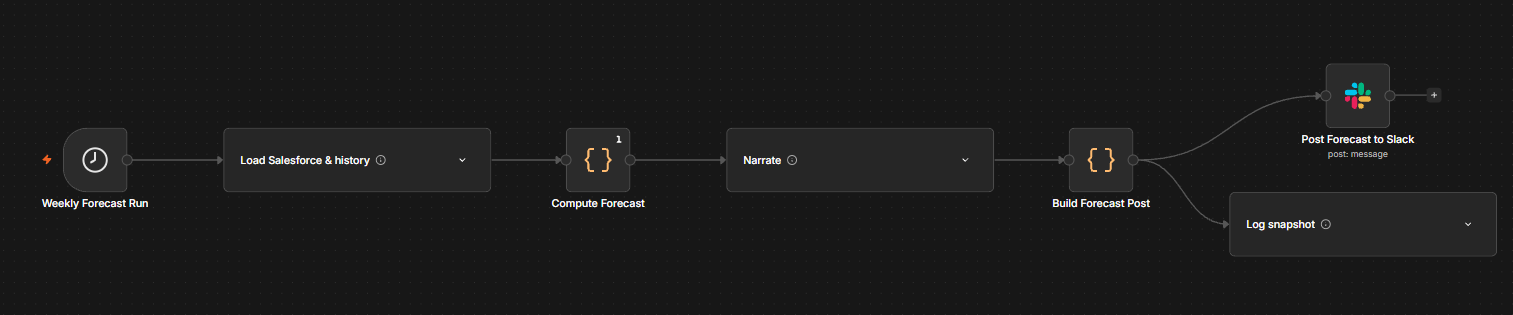
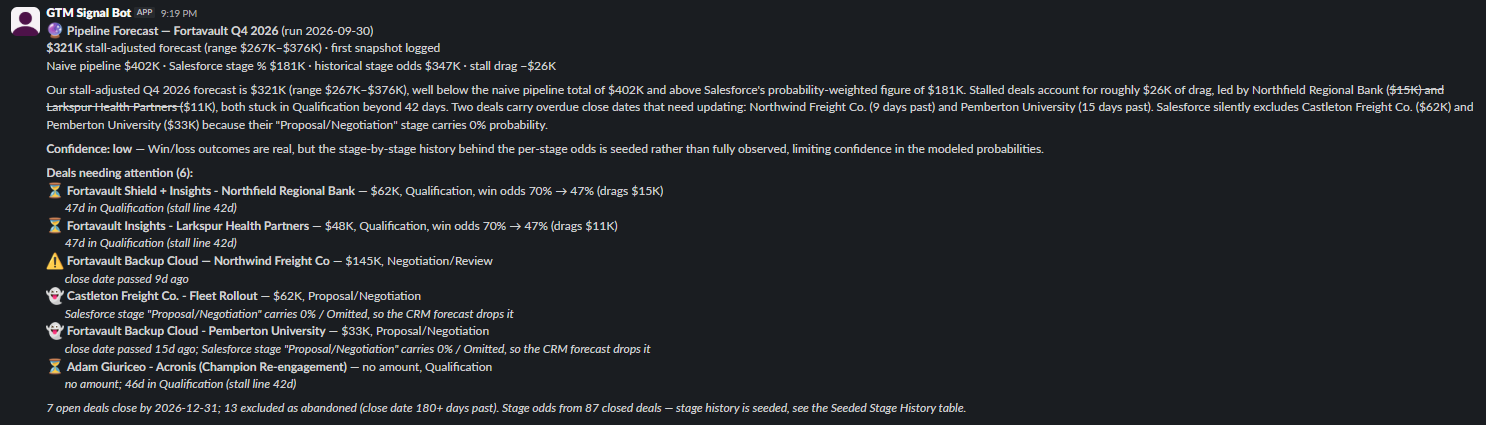
Impact (measured from live runs)
The Multi-Touch Attribution Tracker
~5 min read
Every week, each Closed Won deal's touch history is run through three attribution models side by side: first-touch, last-touch and linear. The models are computed in code so their differences come from the data, and Claude's Slack note focuses on where they disagree, which is usually the most useful part.
The Multi-Touch Attribution Tracker
~5 min readEvery week, each Closed Won deal's touch history is run through three attribution models side by side: first-touch, last-touch and linear. The models are computed in code so their differences come from the data, and Claude's Slack note focuses on where they disagree, which is usually the most useful part.
The Problem
An earlier build in this series tied one kind of event to revenue after the fact: which trade shows produced which deals. Marketing teams eventually ask the broader version of that question. Across every touch a buyer had before the deal closed, which channels actually contributed? Most answers pick one model and report its number. First-touch credits whatever started the conversation. Last-touch credits whatever happened to come right before the signature. Each one quietly defunds the channels the other one favors, and nobody sees the trade-off because only one number is ever on the slide.
The Build
Each week n8n pulls every Closed Won opportunity from Salesforce for the trailing twelve months, along with each deal's touch timeline in date order. A Code node applies three models to the same sequences. First-touch gives all of a deal's revenue to its earliest touch, last-touch gives it all to the latest touch before close, and linear splits it evenly across every touch. The results are rolled up by channel and by campaign. For each channel the code also computes the spread, the largest gap between its shares under the three models, and a simple pattern label. A channel whose last-touch share runs 10+ points above its first-touch share closes deals; the reverse opens them; anything else is consistent.
Claude gets the finished numbers and is told to write about where the models agree and disagree, not to restate each winner. It may describe a channel only by the pattern the code assigned. The Slack post leads with the three leaders and a side-by-side table, then the note. Every run's channel numbers are logged to an Attribution Snapshots table, so shifts in the mix show up over time. A live HubSpot check also runs every week and reports how many contacts have any tracked digital touches at all.
Real vs. Simulated
The 41 Closed Won deals in the period, their amounts and close dates ($2.14M in total), the three models, the roll-ups, Claude's note and the Slack post are all real. So are the seven event touches: for the seven deals the earlier event-ROI build tied to trade shows, the touch is that build's recorded event and badge-scan date. Everything else in the touch timeline is seeded, and the reason is a real finding. The live HubSpot check reports that 0 of the portal's 11 contacts have a single tracked page view, form fill, email open or click. None of the won deals has a contact linked to it in Salesforce. And HubSpot can't backdate page views or form fills to before a deal closed. There is no real digital touch history to attribute, and the build says so in every post.
So a one-off setup workflow generated a touch sequence for each real won deal with a fixed rule: 2 to 6 touches spread over the 30 to 150 days before its real close date, with a fixed random seed so the 254 rows can be reproduced. The channel at each position is drawn from position-based weights. Paid search, organic search and content are likelier first; email nurture and webinars in the middle; a demo request last. That rule is the honest caveat for everything below. The opener and closer patterns the models find were built into the seed, so this run demonstrates the method rather than discovering which Fortavault channels work. The engine is the real part. Once HubSpot tracking is in place, it reads real timelines instead.
Real Results: Where the Models Disagree
Share of $2.14M in attributed revenue under each model, from the live run:
Every model crowns a different winner: paid search under first-touch, demo requests under last-touch, email nurture under linear. That's the point of running them side by side. Claude's unedited note, exactly as posted:
A Real Wording Bug: Roles the Data Never Assigned
The first run, with Slack and logging switched off, read well, but Claude described organic search as a “mid-funnel” contributor. Nothing in the data says where in the funnel a channel sits. The code only labels channels as opening deals, closing deals or contributing consistently. A reader would take “mid-funnel” as a finding. The prompt now limits Claude to the pattern the code assigned, and the live note calls organic search “consistent.” The same test run caught $2.14M printing as “$2137K,” and the post now formats millions properly.
Live Run
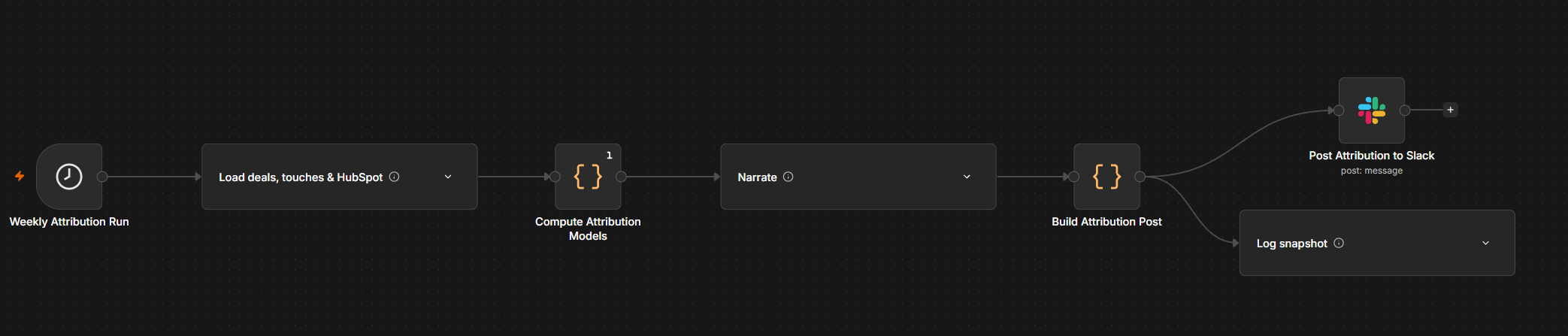

Impact (measured from live runs)
The Duplicate Contact Consolidator
~6 min read
Finds Salesforce records that share an email: duplicate Contacts, and open Leads that already have a Contact. It proposes one survivor per person and asks for approval in Slack. It then runs Salesforce's real merge and lead conversion through Apex, pushes the clean record to HubSpot, and re-checks both systems for exactly one record per email. The final build of the sprint.
The Duplicate Contact Consolidator
~6 min readFinds Salesforce records that share an email: duplicate Contacts, and open Leads that already have a Contact. It proposes one survivor per person and asks for approval in Slack. It then runs Salesforce's real merge and lead conversion through Apex, pushes the clean record to HubSpot, and re-checks both systems for exactly one record per email. The final build of the sprint.
The Problem
Duplicates are the quiet tax on every other automation in this series. When the same buyer exists as two Salesforce Contacts, or as a Contact plus a forgotten open Lead, activity gets split between records. Scores read half the history, and reps work whichever record they clicked into first. The tempting fix is “copy the fields over, then delete the extra record.” That fix is dangerous. Every opportunity role, case, task and note attached to the deleted record goes with it unless each one is moved over by hand first.
The Build
Each week n8n reads every Salesforce Contact and open Lead that has an email, plus everything attached to them: opportunity roles, cases, tasks and events. Code groups the Contacts by email and picks one survivor per group. The rule, decided deliberately for this build, is that the record with the most attached history wins, with ties going to the most recently modified. Before merging, any blank field on the survivor (phone, title, mobile) is filled from the duplicate, because a merge keeps the survivor's values. Separately, any open Lead whose email already belongs to a Contact is queued for conversion onto that Contact rather than becoming a new one.
Nothing changes without a person. The full plan goes to Slack as an approval request: every record side by side, which one survives and why, and what will be filled. The workflow then pauses until someone clicks Approve or Decline. On approval it makes the changes:
- Merges use Salesforce's native
Database.merge, the same operation as the Merge Contacts button, which moves everything attached to the duplicate onto the survivor. - Conversions use
Database.convertLeadonto the existing Contact, with no new Contact and no opportunity created. - Each surviving record is upserted into HubSpot by email.
Finally, both systems are queried again, and each email must come back with exactly one Salesforce Contact, zero open Leads and one HubSpot contact. Every action and check is written to a Dedupe Audit Log. If verification fails, Slack gets a red alert instead of a green summary.
Why Apex, and How It Got There
Salesforce's merge is only reachable from Apex. The standard REST
API that n8n's Salesforce node uses can update and delete records,
but it can't merge them. Merging is what moves the attached
records over, and that is what makes it safe to run against real
opportunities and cases. So this build adds a small Apex REST
endpoint, DuplicateMergeService, which takes a
survivor and up to two duplicates and calls
Database.merge. The original plan had that class
pasted into Salesforce Setup by hand. Instead, n8n deployed it
through Salesforce's Tooling API with the same OAuth credential
every other build uses, then confirmed it compiled and was Active
before anything ran. That works because this is a developer org.
A production org would deploy Apex through a sandbox and change
set with test coverage, and the write-up doesn't pretend
otherwise.
Real vs. Simulated
One duplicate pair was seeded to give the merge something to do. Two Contacts named Jordan Ellis share an email at a real account, Harborstone Insurance. The older record has the history: a Decision Maker role on Harborstone's real won deal and two tasks. The newer one has a single task and was edited more recently. A “most recently modified wins” rule would have kept the empty record. The activity rule keeps the right one.
The Lead–Contact cases weren't seeded; they were already in the org. Two of Salesforce's own sample Leads, Pat Stumuller and Andy Young, share emails with existing Contacts. Both have the status “Closed – Converted,” yet Salesforce reports them as never converted. That's a stale status that hides two open duplicate Leads from anyone filtering on it. Everything after that point is real: the merge, the conversions, the HubSpot records and the verification counts.
A Real Salesforce Bug: The Conversion Endpoint That Wasn't There
The design called for lead conversion through Salesforce's REST
“convertLead” action. On the first live run the merge
went through, but both conversions came back with a 404:
Invalid Action Type: convertLead. No such action exists
in this org, so lead conversion, like merging, is effectively
Apex-only. The workflow did what it was built to do. A failed call
doesn't stop the run; it's logged, and verification then found one
open Lead still sitting on each of those emails. Slack got a red
“verification FAILED” alert rather than a false
success. The fix was a second small Apex endpoint,
LeadConvertService, built on Salesforce's own
lead-conversion call against the existing Contact. It was deployed
the same way, and on the next approved run both conversions went
through and every check came back green.
Before and After
HubSpot is the lighter half on purpose. HubSpot already enforces one contact per email, so true same-email HubSpot duplicates are rare, and this build doesn't try to manufacture one. It's really Salesforce dedupe plus a HubSpot sync: the surviving Salesforce record is the source of truth, and HubSpot is upserted to match.
Live Run

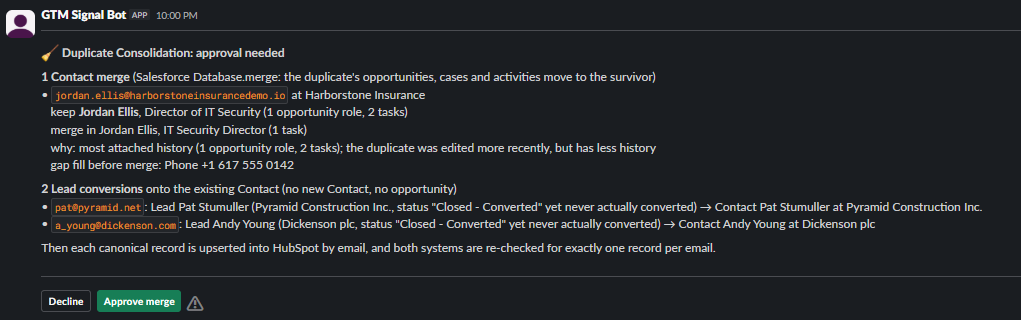
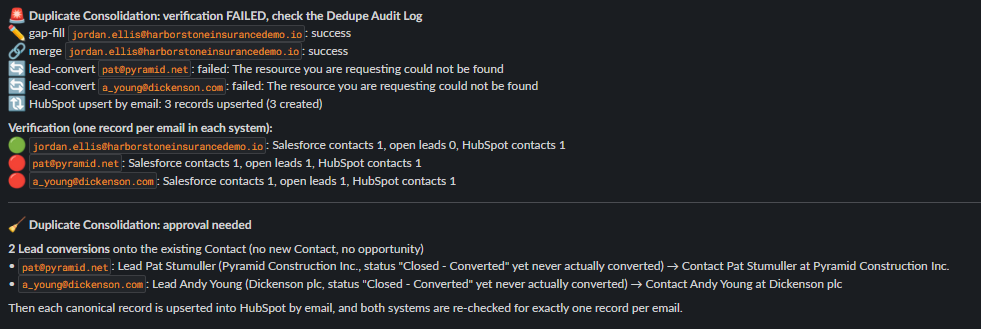
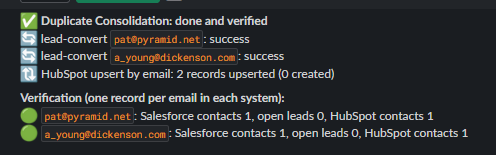
Impact (measured from live runs)
Closing the Sprint
This is the twenty-first and final build. The early days wired single systems together: Salesforce into Slack, one signal at a time. The middle of the sprint changed shape when HubSpot and Clay came online. With no native link between HubSpot, Clay and Salesforce, n8n became the connective tissue, and the builds started checking one system against another. Engagement got counted against fit, research against pipeline, the CRM's forecast against its own history. The last stretch turned to the data underneath. The forecast and attribution builds were honest about what this org's history can and can't support. This one makes sure there's one real record per person for everything else to stand on.
The same few rules held across all twenty-one builds:
- Every number is computed in code; Claude explains, never decides.
- Anything that merges, reopens or creates deals in the CRM asks a person first; the automatic writes are limited to low-stakes fields like a lead grade or a new support Case.
- Seeded data is always disclosed.
- When a run surfaces a real bug, it gets written up rather than hidden.